If you have learned how to use Claude but have not made a dollar with it yet, the next move probably is not learning another complicated AI setup. It is finding one small thing a business already pays for and getting good enough to deliver it.
My favorite starting point right now is building websites with Claude, then using that relationship to solve bigger business problems with AI automation.
You do not need a team of agents or expert-level knowledge to start. You need a useful skill, a specific type of client, and something concrete you can put in front of them. The roadmap has four steps:
- Pick one type of client.
- Build a website demo before asking for the sale.
- Send it to the business and make the next step easy.
- Find one automation you can sell to that same business.
Key Takeaways
- Specialize in one client type so your research, website builds, and portfolio become more repeatable.
- Build a tailored website demo before outreach so prospects can evaluate something concrete.
- Make your offer clear, lower the initial risk, and follow up with useful information.
- Expand client relationships by solving one automation problem and proving its value with a measurable result.
Why Starting Small Works
When I started my agency, I sold one-hour consulting calls where I helped people with fairly small problems. Some of those people became my largest ongoing clients.
They did not suddenly develop the time or desire to learn everything about AI themselves. Once I helped them with something, they kept coming back with the next question or project. I became their AI person.
My first workflow sale was a LinkedIn content system for $1,200. It took me about two hours to build. That was not a website project, and it is not a suggested website price. The point is that I was not an expert when I made that first sale.
A small project gets you inside the business. Once you are there, you can understand how it runs, see where things break down, and help with the next problem.
Websites are a useful entry point because businesses already understand buying them. You are not asking an owner to understand some giant AI operating system. You are showing them a better version of something they already need.
Step 1: Pick One Type of Client
Do not start by trying to build websites for everyone.
A dentist, an ecommerce brand, and a creator have different customers, offers, and priorities. If you keep changing industries, you keep relearning what a good website needs to do.
Choose one industry and the work becomes more repeatable. A dental website will usually need appointment booking, insurance information, and reviews. After you build one, you have a foundation you can adapt for the next practice.
Your portfolio also becomes more relevant. A dentist is going to care more about a good dental website than an unrelated project. It is the same reason someone with a Mercedes might prefer a mechanic who only works on Mercedes. Specialization makes the decision easier.
Use Three Filters to Choose Your Industry
- They have a budget. Look for businesses already spending on marketing or websites. Replacing an existing expense is an easier conversation than introducing a completely new one.
- A new customer is valuable. For businesses such as dentists or roofers, one customer can be worth hundreds of dollars or more. A website that helps generate inquiries has a clear business purpose.
- You can find a list of them. You need a practical way to identify prospects, whether that is a member directory, an industry association, or Google Maps.
One member of my community, Sav, used directories such as the American Institute of Architects rather than starting with giant lead-generation tools. The directory had already done some of the filtering for him.
You can ask Claude to help brainstorm professional associations and member directories for your chosen niche. Or start with the industry you already work in, provided it meets those three filters.
For a simple local approach, search Google Maps for your chosen business type and city. Open their websites and look for obvious opportunities to improve them. If you are comfortable pitching in person, being local also gives you a straightforward way to start a relationship.
Step 2: Build the Website Before You Ask
A lot of people spend weeks building practice sites for a portfolio before they ever contact a business. I would rather have that practice project do two jobs: improve your skills and give you something you can actually sell.
Pick a real business in your niche and build a better version of its website. If you want to become the AI person inside your current company, rebuild a page for your own company instead.
This works because the owner does not have to imagine what you mean by “a better website.” They can open it and decide.
Design matters here. Stanford research on website credibility found that visual appearance was the most frequently mentioned factor in people’s credibility judgments. We experienced that ourselves with the AI Automation Society website. The earlier version felt cheap. Simplifying the colors and adding more intentional layering and depth made it feel much better.
Think of your demo as a free sample. You are not just saying you can make something good. You are handing over a small example.
Before AI, spending weeks on a custom proof of concept for someone who might ignore you was a pretty big risk. Claude changes how much time that first version can take. One of my recent builds took about 15 minutes, followed by roughly 10 minutes of feedback. That is a first version, not a promise that every production website is finished in 15 minutes.
Find a Business With a Clear Improvement Opportunity
For my example, I searched Google Places for med spas in Chicago and chose Better You Spas.
I wanted a business whose existing website left room for a meaningful upgrade. If a prospect already has an excellent site, there may be better places to spend your time.
The med spa had branding, a founder story, service information, and calls to action. But the presentation could be improved, and the Services link led to a page that did not exist.
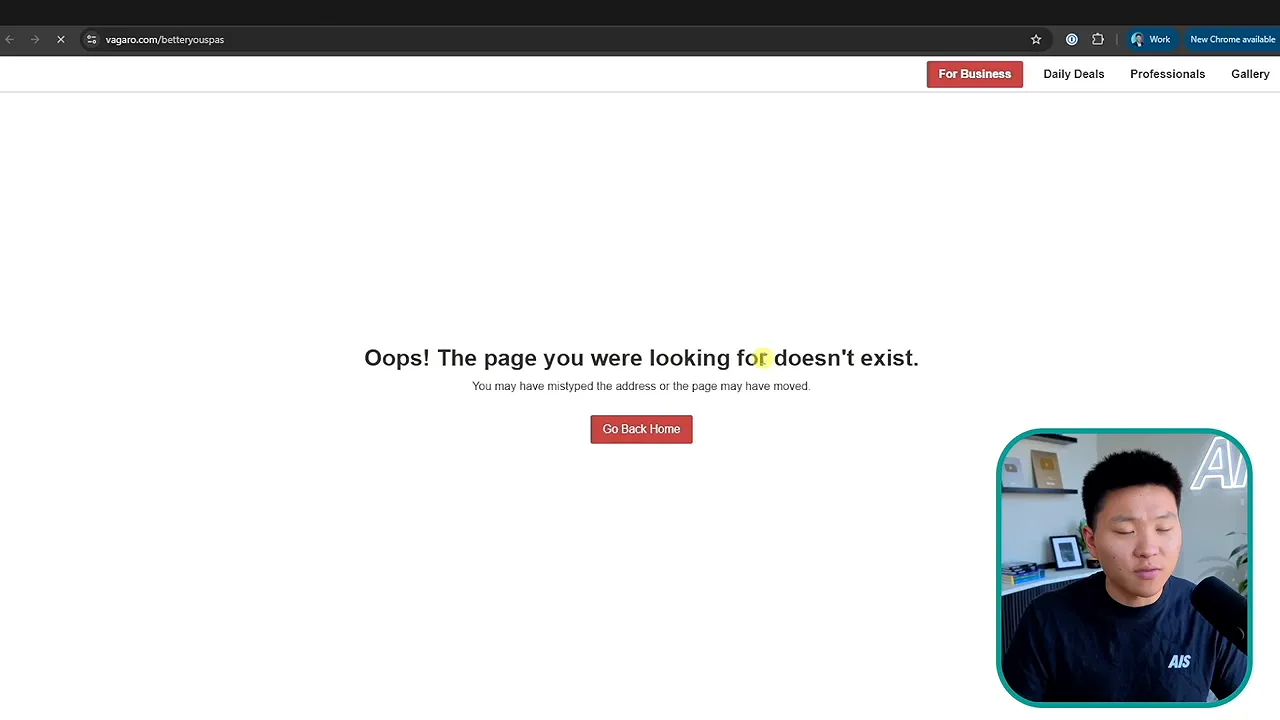
That gives you a specific problem to solve. You are not redesigning just for the sake of redesigning.
Research the Business Before Generating the Design
Do not ask Claude to make a generic premium med spa site and hope it fits.
First, give Claude the existing website URL and ask it to investigate the business. In my workflow, I used Glaido to send that request into Claude Code. The important part is the research brief, not the extra tool.
Ask Claude to identify:
- What the business does and the main promise it makes.
- Who its target customers are.
- Its logo, colors, and overall branding.
- The services it offers.
- How it currently encourages people to call, book, or submit an inquiry.
A useful request is:
Investigate this business website and summarize its audience, services, positioning, branding, and current booking process. Use that research as the foundation for a redesigned website demo.
The goal is to make the business look better without turning it into a completely different business.
Give Claude Clear Design Direction
I use my free ScrollCraft website design skill to help Claude with typography, spacing, depth, layering, and scroll-driven animation. You can also find it in the AI Skills classroom inside my free community. If you already have it installed, you can skip that setup step.
Once Claude has the business research and the design skill, give it a focused brief:
Build a website demo for this business using ScrollCraft. Keep its branding, audience, services, and core promise. Pull real images from the existing site where available. Make the design feel more premium through strong typography, spacing, layers, depth, and subtle professional scroll animations. Keep the experience focused on turning interested visitors into inquiries.
The last sentence matters. Looking good is not enough. The website needs to make it easy for someone to understand the offer and take the next step.
Review the First Version, Not Just the Hero Section
The first version of the med spa demo retained the logo and included navigation for treatments, results, the founder, and visiting the business. It also placed booking and phone actions near the top.
The new hero used layered imagery and a much more restrained visual style than the original.
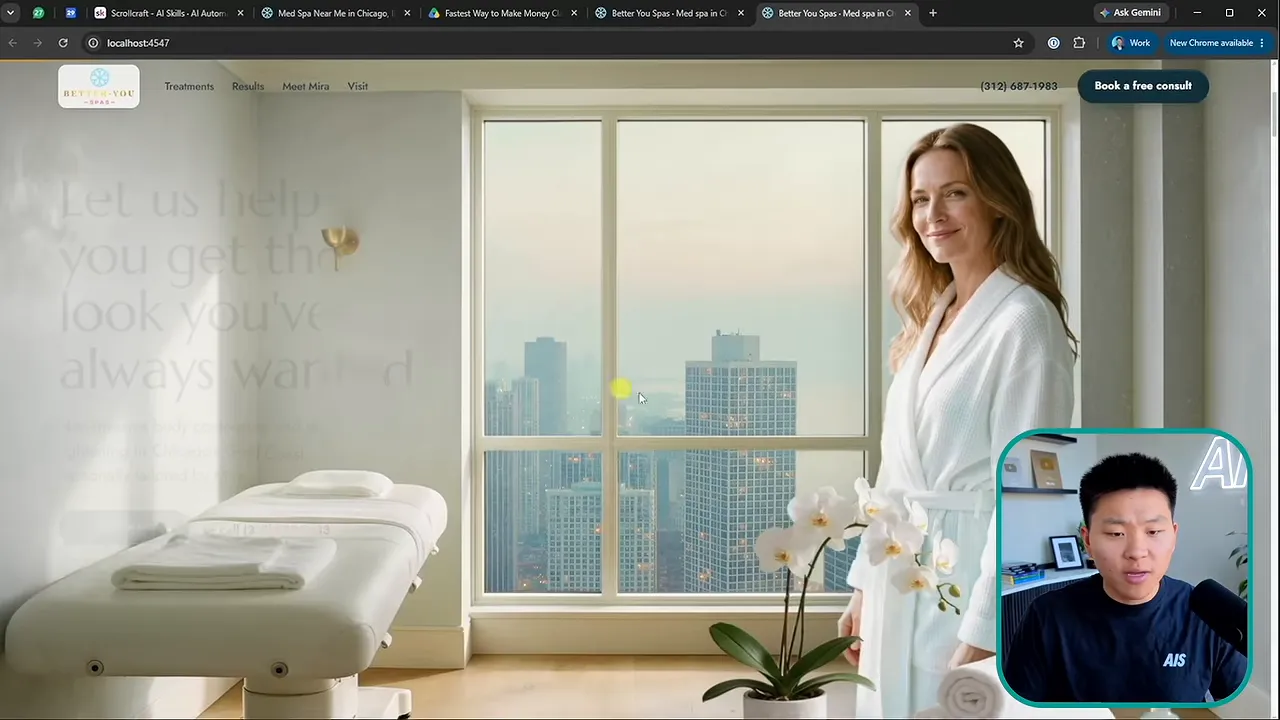
Farther down the page, Claude added an interactive treatment-interest selector, service cards, before-and-after comparisons, a founder section, testimonials, and an inquiry form.
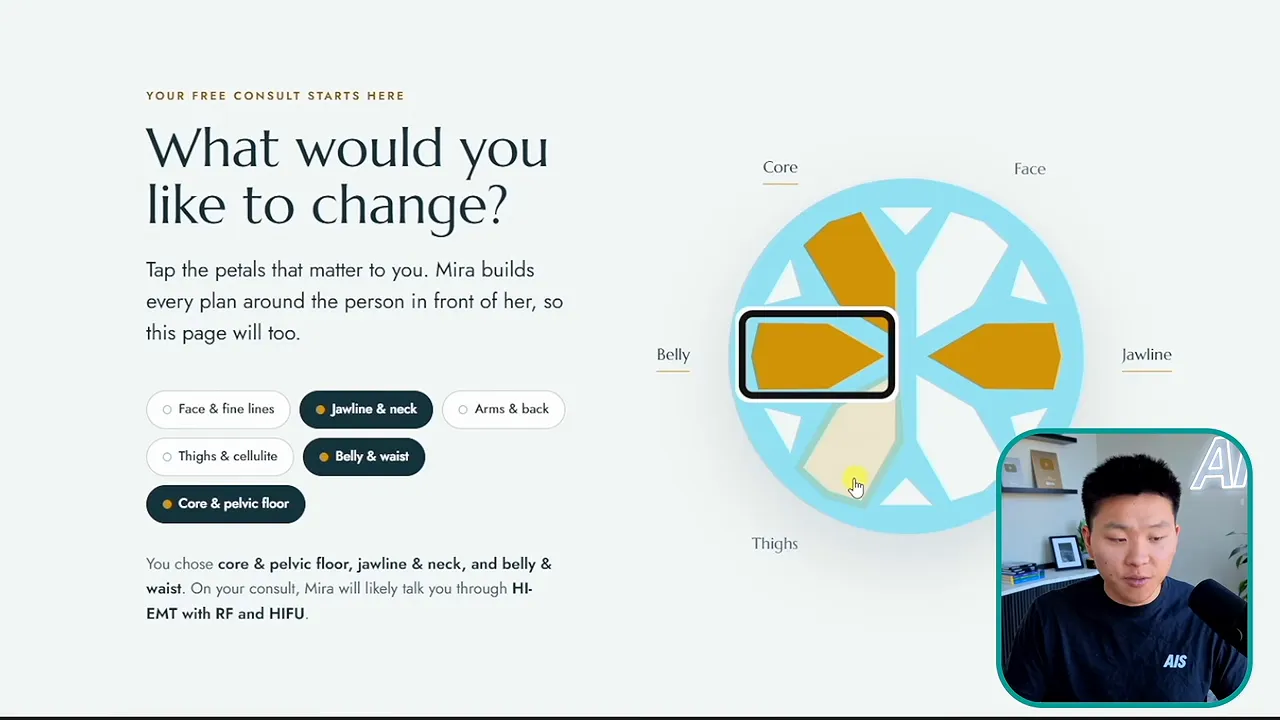
The treatment selector was interesting because it was not just decoration. It helped someone express what they wanted to change and explore relevant services.
But this was still V1. One service card was missing an image, and the form backend was not connected. Those are things to resolve rather than assume Claude has handled.
The form also revealed a possible next project: automating what happens after someone submits an inquiry. That is exactly the kind of opportunity you want to notice.
Make the Demo Accessible Outside Your Computer
There is an easy mistake to make here: sending the client a localhost link.
Localhost runs on your own computer. Sending that address to a prospect does not give them access to your site. You need a publicly accessible URL.
I first asked Claude to publish the demo as a public artifact. In this particular attempt, it declined because the page used another company’s real name, logo, and branding. So I used Vercel instead.
The deployment workflow was straightforward:
- Ask Claude Code to prepare the project for deployment to Vercel.
- Have it check whether the Vercel CLI is installed and set it up if needed.
- Sign into your Vercel account and authorize access.
- Complete two-factor authentication if your account requires it.
- Let Claude Code configure the project and deploy it.
- Open the public URL and test it on your phone before sending it.
If you are building a lot of demos, my recommendation is to organize them under one project with separate paths for each business, rather than creating a new Vercel project every time.
A screen recording is another option if you do not want to deploy the demo yet. I still prefer giving the business a link it can explore directly.
Once the business approves the site and agrees to move forward, you can connect its existing domain by updating the appropriate DNS records at its domain provider. The demo address does not have to be the final website address.
As you repeat this process, you can package the research, design brief, and build instructions into a reusable skill. Start by understanding the workflow yourself, then systematize the parts you keep repeating.
Step 3: Send It and Make Yes Easy
Now send the demo to the owner or the relevant department head and offer to help put it live.
If you are doing this inside your own company, send it to your manager. Either way, the person should understand what you changed and what you want them to do next.
Sav used a low-risk offer to land his first cold client. He offered to do the work for free in exchange for permission to use the project as a case study, with the possibility of a testimonial or referrals.
His first cold client was a video agency. They insisted on paying him because they liked the work, and they were still working together months later. That is his experience, not a guarantee that free work will turn into paid work. What matters is that he made the initial decision easy and delivered something useful.
Use a Simple Outreach Structure
Sav was pitching a lead-generation system rather than a website, but the structure of his email is useful:
- Start with something personal. Give a genuine reason you contacted that business.
- Add relevant proof. He had already built a website and booking automation for a family member’s beauty salon.
- Make a specific offer. Explain the outcome, timeframe, and terms.
- Ask for a small next step. His ask was permission to send a 90-second demo.
His lead-generation pitch proposed a system targeting 23 discovery calls a month, with payment dependent on results. That was the offer, not a result to copy into your own pitch. Use proof and commitments you can honestly support.
When you are starting without a case study, the website demo itself gives you something concrete to share. For example:
Hi, I found your practice while looking for a local dentist and put together a refreshed version of your homepage.
Here is the demo: [link]. You can explore it before making any decision.
If you like the direction, would you like me to send over the details for putting it live this week? There is no obligation to use the demo.
If you choose to offer your first implementation for free in exchange for a case study, say that clearly. If it is a paid implementation, make those terms clear before starting the work.
For an internal project, the message can be even simpler:
I rebuilt the page where customers keep getting stuck. Here are the before and after versions. Would you be open to swapping it in this week? If it does not help, we can switch back.
Follow Up With Something Useful
Do not send one message and decide the strategy does not work.
Follow up a few times, and add something new each time. A screenshot of the demo on your phone gives the owner another concrete reason to look at it. You can also build automation to help manage those follow-ups.
If someone says no, move on. Rejection is normal. Even with warm leads coming through my own content, it took me around 15 discovery calls to land my first client.
I find it more useful to aim for my first ten noes than to obsess over how quickly I can get one yes. It keeps the focus on taking action instead of treating each response as a verdict on your ability.
Step 4: Sell One Useful AI Automation to the Same Business
The website is your entry point. It does not have to be the entire business model.
Before you finish the website project, start identifying one related operational problem you could solve. You already have some trust, and you are learning how the business works. That is a better starting point than introducing yourself to a stranger again.
Do not immediately pitch a giant system that automates the whole company. That increases the price, complexity, and risk.
Solve one problem at a time.
Take the dental example. The new website starts generating booking requests, but the practice takes days to respond. Those people may book with another dentist while they wait.
A lead follow-up system is a natural next conversation:
While setting up the website, I put together a demo of a system that follows up with new inquiries. Can I send you a two-minute walkthrough?
This is how you move from website builder to the person a company calls about AI. I use a simple framework: spot, build, prove.
Spot: Find the Actual Problem
While putting the website live, ask what happens after someone fills out the form. What is annoying? What takes too long? Where does the team lose track of people?
Listen carefully, because the thing a client asks for is not always the thing they need.
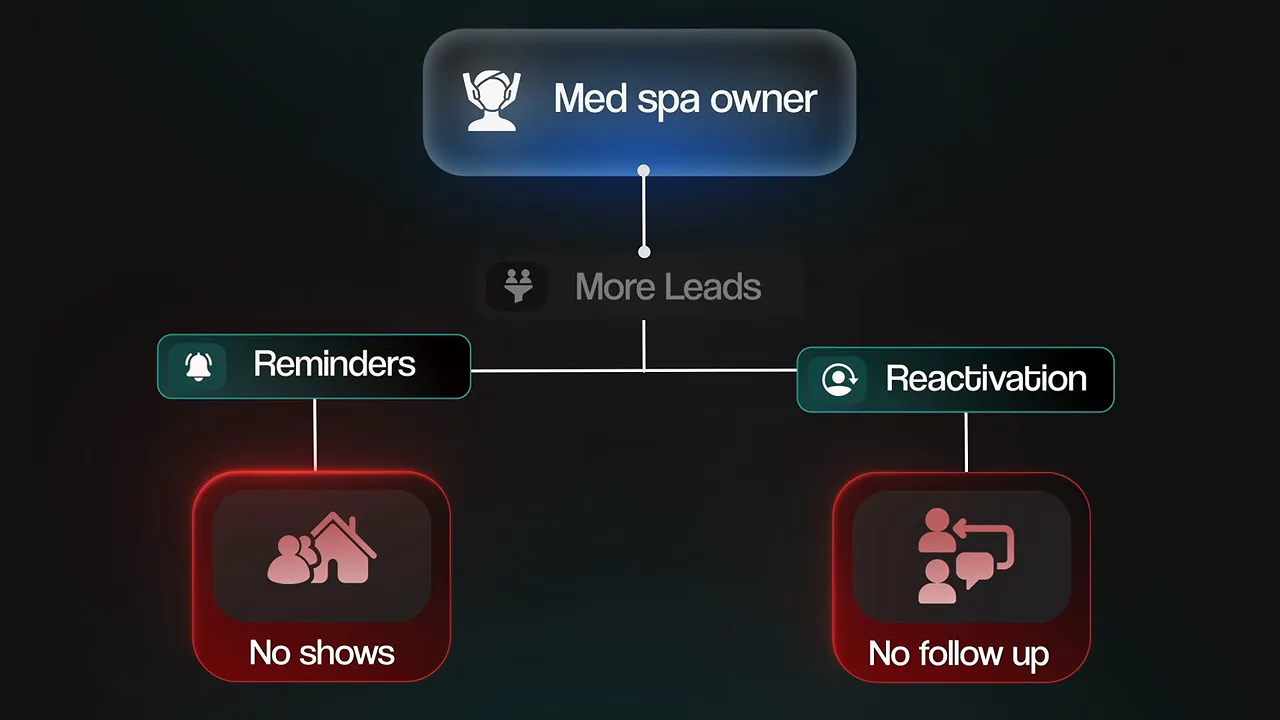
I had a med spa owner ask for more leads. But the real problems were no-shows and a lack of follow-up. We built reminders and reactivation instead of another lead-generation system.
More inquiries would not have fixed those problems. They would have sent more people into the same broken process.
Build: Create a Focused Solution
Once you understand the problem, research how to build an automation or agent that addresses it.
Keep the scope narrow. Build a demo, record a short explanation of how it works, and ask whether the client will let you run it for 30 days.
You are making another small, understandable offer rather than asking them to commit to a huge transformation.
Prove: Track One Number
Before deploying the automation, choose one metric that will tell you whether it helped. That could be:
- Time saved.
- Mistakes made.
- Appointments booked.
Pick the number before the trial starts. After 30 days, show what changed.
The point is to move the conversation from “this AI system seems cool” to “this solved a problem we care about.” That gives you a stronger foundation for ongoing paid work.
Keep a V2 List to Protect Your Scope
At my agency, we kept a V2 list, also called a new-project list.
Whenever a client asked, “Could you also do this?” during a build, we wrote it down rather than automatically adding it to the current project.
That protects you from scope creep without losing a useful idea. By delivery, the client has a list of possible next projects, many of which came directly from them.
Then you repeat the process: spot the next problem, build a focused solution, and prove that it helped.
Get Paid to Solve the Next Small Problem
You do not need to master every AI tool before you can be useful to a business.
Pick one niche. Build a demo that makes a visible improvement. Put it somewhere the owner can open it. Send a clear message, follow up, and learn from the responses.
Then use the relationship to understand what the business needs next. A better website might open the door, but solving real problems is what gives people a reason to keep calling you.
If you need help getting started, my free AI Automation Society community includes courses, workflow challenges, and reusable AI skills. The goal is not to keep learning forever. It is to learn one useful thing, deliver it, and build from there.


