Claude can now turn an artifact into an app you install on your Mac or Windows computer. That little tracker or dashboard your team uses no longer has to live in another browser tab. It can have its own icon, open in its own window, and sit right on your desktop.
That is useful on its own. But the bigger story is what artifacts are becoming: shared pages that store data, connect to your apps, call Claude, and keep improving after you send someone the link.
I’m excited about this because it removes a lot of the work between getting a useful AI response and giving your team something they can actually use. There are limits, though, and the risk of putting too much of your business inside one AI ecosystem is real.
Key Takeaways
- Eligible Claude artifacts can become desktop apps without a separate API key.
- Shared artifacts can store data, use connected apps, and call Claude.
- Artifacts fit small internal workflows better than complex applications or full spreadsheet replacements.
- Keep core knowledge and data under your control, using artifacts as the shared interface.
How to Install a Claude Artifact as a Desktop App
The installation process is pretty simple:
- Build an artifact in Claude as you normally would.
- Open it inside the Claude desktop app.
- Open the Share menu or click the artifact’s name.
- Select Install as app and confirm the installation.
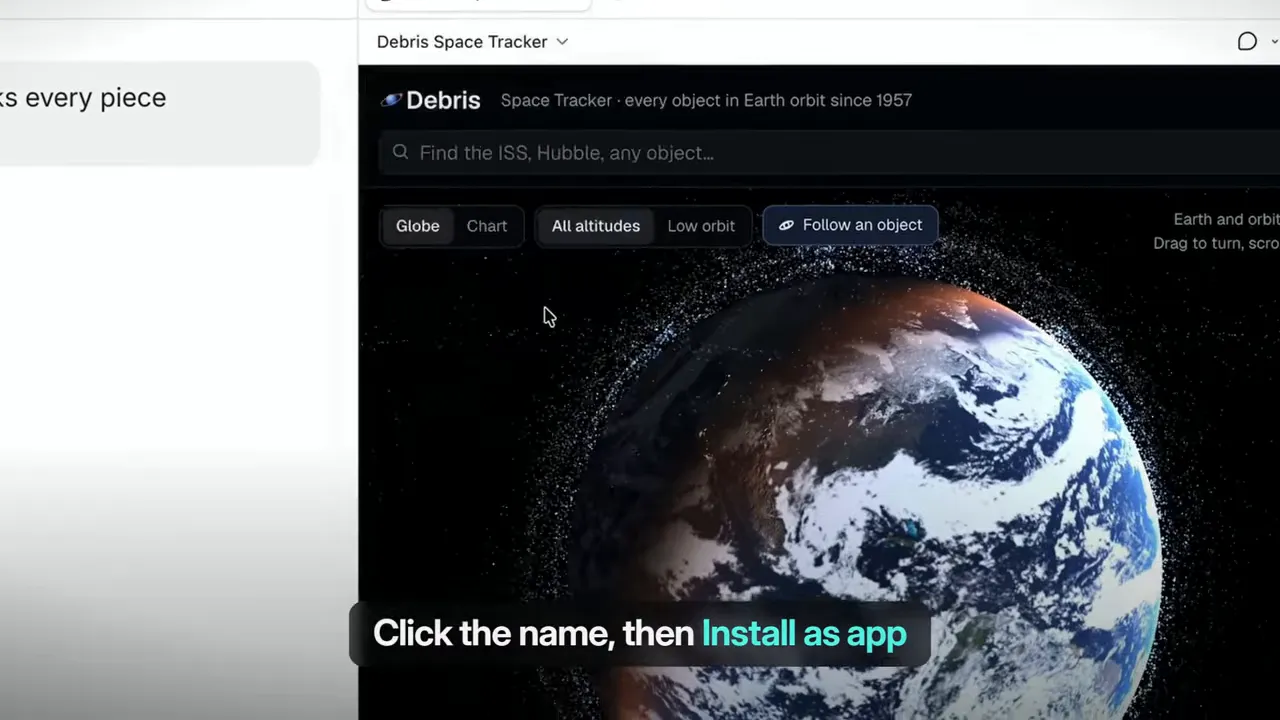
Once installed, the artifact gets its own icon and opens in a separate window, like another app on your computer.
I did this with my Content OS dashboard, which brings together my video pitches every morning. Having it open as a dedicated app makes it much easier to get to than digging through browser tabs.
These apps can still use Claude and your connected services. They can send notifications, appear in your Mac menu bar or Windows system tray, and update when you update the underlying artifact. There is no separate API key to configure. The app uses your Claude account.
Beta limitations and permissions to take seriously
At the time of this release, installing artifacts as apps is in beta and still rolling out. If you do not see the option, check your availability rather than assuming you have done something wrong.
There is also an important distinction between custom interactive artifacts and template-based work. Artifacts made from templates, such as Docs, Slides, or Sheets, cannot be installed as desktop apps.
Be especially careful when an app requests access to your computer. Permission to run programs or change local files is a much bigger deal than permission to display a dashboard. Only grant that access to apps you built or genuinely trust. Anthropic does not automatically review these apps before installation.
What Claude Artifacts Actually Are
An artifact is something Claude creates that you would put in front of another person: a document, presentation, design, dashboard, report, or small interactive tool.
Instead of leaving that work buried in a conversation or downloading another file, you can publish it as a page and share a link. Artifacts start private, so having a link does not mean your work is automatically public. You choose whether to share it with your team or make it more broadly accessible.
The seven templates introduced with these upgrades are:
- Docs: Documents.
- Slides: Presentation decks.
- Design: Visual designs.
- Data: Data-connected dashboards.
- Sheets: Simple spreadsheets.
- Whiteboards: Visual planning and brainstorming boards.
- Motion: Short animated explainers.
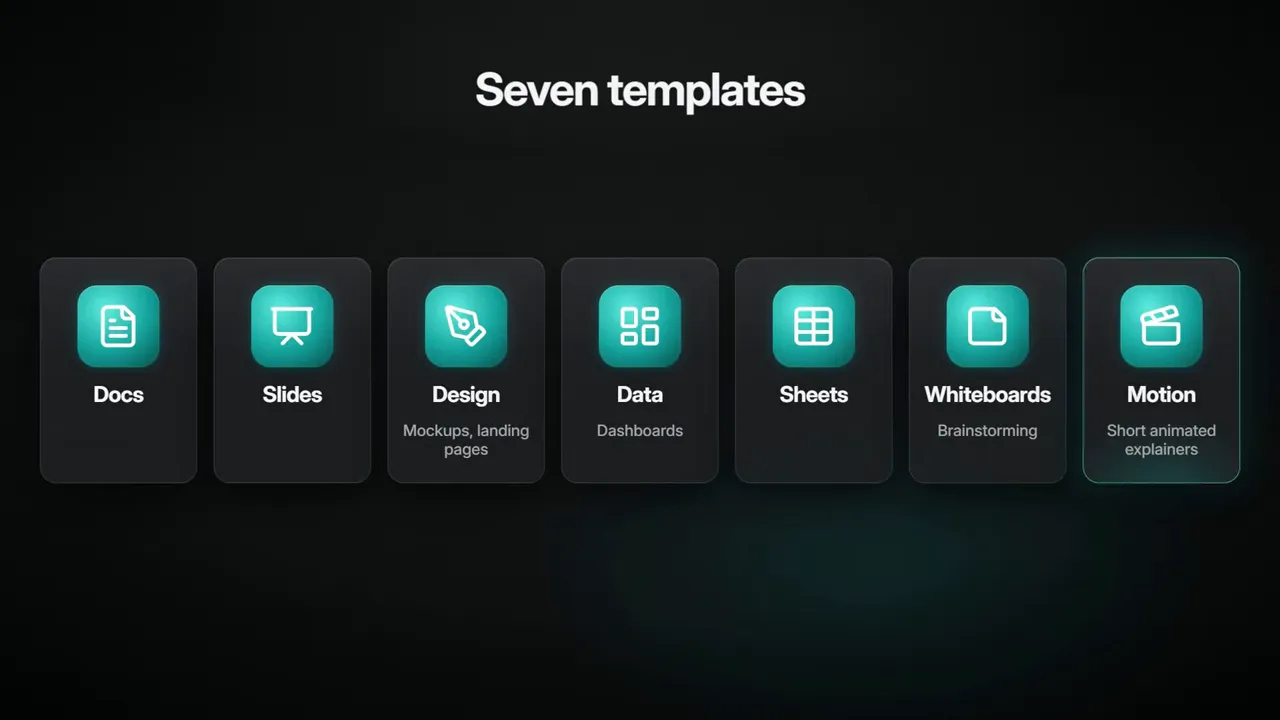
At the time of the announcement, Docs, Slides, and Design were available on every plan, including Free. Sheets, Whiteboards, and Data required a paid plan, while Motion was limited to Team and Enterprise. Availability is changing, so check your own plan.
Inside Claude Code, where I spend most of my time, a session can build something like a report or small tool and publish it as an artifact. Each update becomes another version at the same link.
If your team has ever passed around HTML files, downloaded a revision, and then downloaded another revision, you know why that matters. The link stays the same while the work evolves.
The Biggest Improvement Is Getting Work Into Your Team’s Hands
Getting Claude to make something useful was not necessarily the hard part. Getting that thing in front of everyone else was often where the friction showed up.
You might copy the output into a Google Doc, take a screenshot and send it to Slack, or deploy a generated web page through a service like Vercel. None of those options is impossible, but each adds another step.
And telling a nontechnical teammate to go find something on GitHub is not always the smooth handoff you think it is.
With artifacts, the workflow becomes much more familiar: have Claude build it, hit Share, and send a link.
For our October all-hands meeting, I had Claude create the deck and published it as an artifact. Then I simply opened that page when I shared my screen on the call. I did not need to move the whole thing into another presentation tool just to use it.
The thing Claude makes can now be the thing your team uses. That is the important shift.
These Pages Can Do More Than Display Information
A shared artifact does not have to be a static deliverable. It can do useful work.
- Store shared data: People using a tracker or signup sheet can work from the same information.
- Use connected apps: An artifact can read from and write to services connected to Claude, such as Asana, Google Calendar, and Slack.
- Call Claude: The page itself can answer questions or provide feedback.
That last capability has a useful detail for teams. When another person uses an artifact you built that calls Claude, that usage counts against their own plan limits, not yours.
A cybersecurity training tool without buying a platform
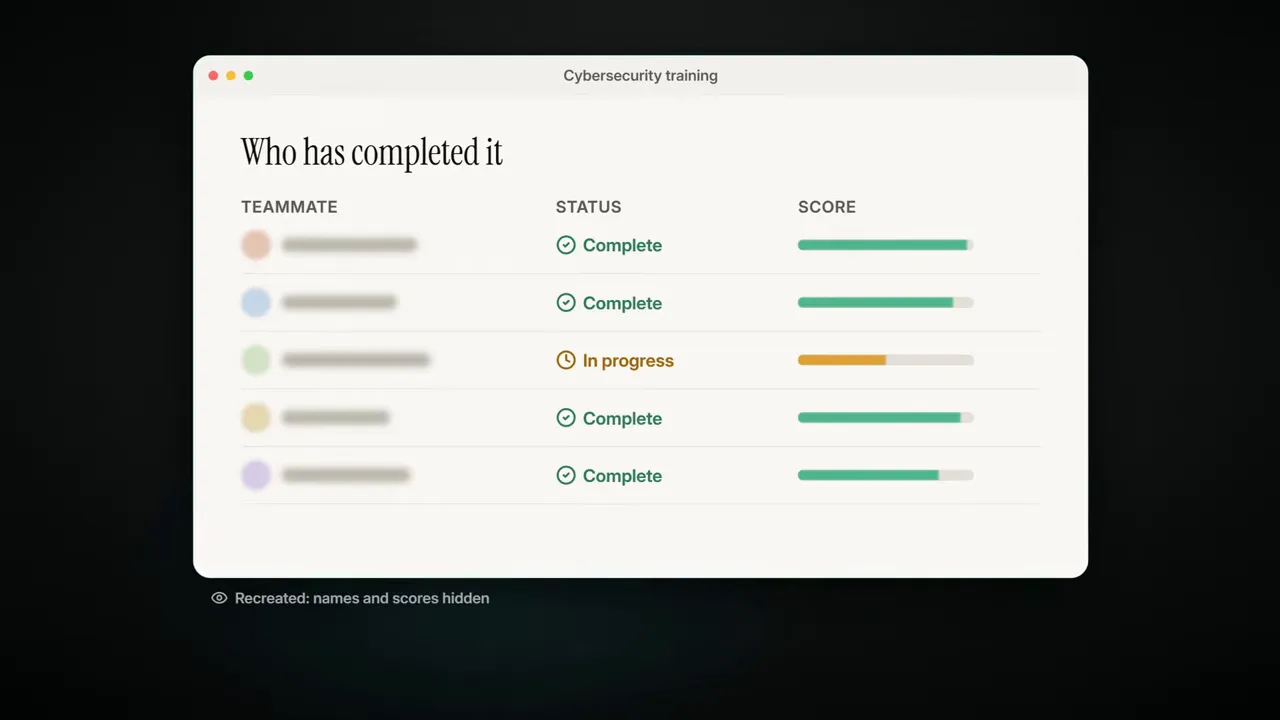
Jen from my operations team needed to roll out cybersecurity training across the company. Instead of buying a training platform or building a separate website, she created it as a Claude artifact.
Claude already had relevant context and could access details through her connected information, including email. That made it easier to put the training together.
Team members could work through the modules, and Jen had a separate view showing who had completed the training and how well they had done. She did not need to be a developer to create that workflow.
A running board for creative work
I also use artifacts for planning and iteration. When we were reworking the logo for my community, we went through multiple rounds of concepts.
Instead of asking Claude to generate piles of local files or separate HTML documents, we kept a running board as an artifact. It could update as we worked, and I could switch between different versions.
That is a much cleaner way to keep an evolving project together.
Feedback that can lead directly to changes
When you share artifacts with your organization, teammates can comment directly on the page or document, much like they would in Google Docs.
The difference is that Claude can act on that feedback. Team members can tag Claude with a requested change rather than leaving a comment that someone has to manually translate into another task.
The deliverable is no longer just the output. It can also contain the tool for improving that output.
What Claude Artifacts Can Realistically Replace
Every major Claude update seems to trigger a round of claims that it just killed a thousand startups. I would not go that far.
I do not think artifacts replace Excel or your CRM right now. Anthropic describes Sheets as having simple spreadsheet functionality. And if you need a fully deployed application with dedicated authentication, a substantial backend, and role-based access control, you will probably want a solution built for those requirements.
The more realistic opportunity is small internal software.
Every team has little tools it either pays a subscription for, manages in a messy spreadsheet, or never gets around to building:
- Hiring trackers.
- Onboarding checklists.
- Training quizzes.
- Weekly KPI pages.
Those are the kinds of workflows where a prompt and a shared link can make a real difference.
My Content OS dashboard
My Content OS scans YouTube, X, and other sources each morning for potential video ideas. The output lands in a dashboard artifact with pitches I can review.
In a few minutes, I can rank ideas, decline them, or approve them. Those decisions sync back into the rest of my Content OS.
The artifact is the interface I use to make decisions, not just a report I read once and forget.
Connected dashboards you can check
With the Data template, you can connect sources such as BigQuery or Salesforce and build a dashboard around that information.
One particularly useful feature is the ability to click a number and inspect the query behind it. That gives you a way to check the work instead of simply trusting a polished set of charts.
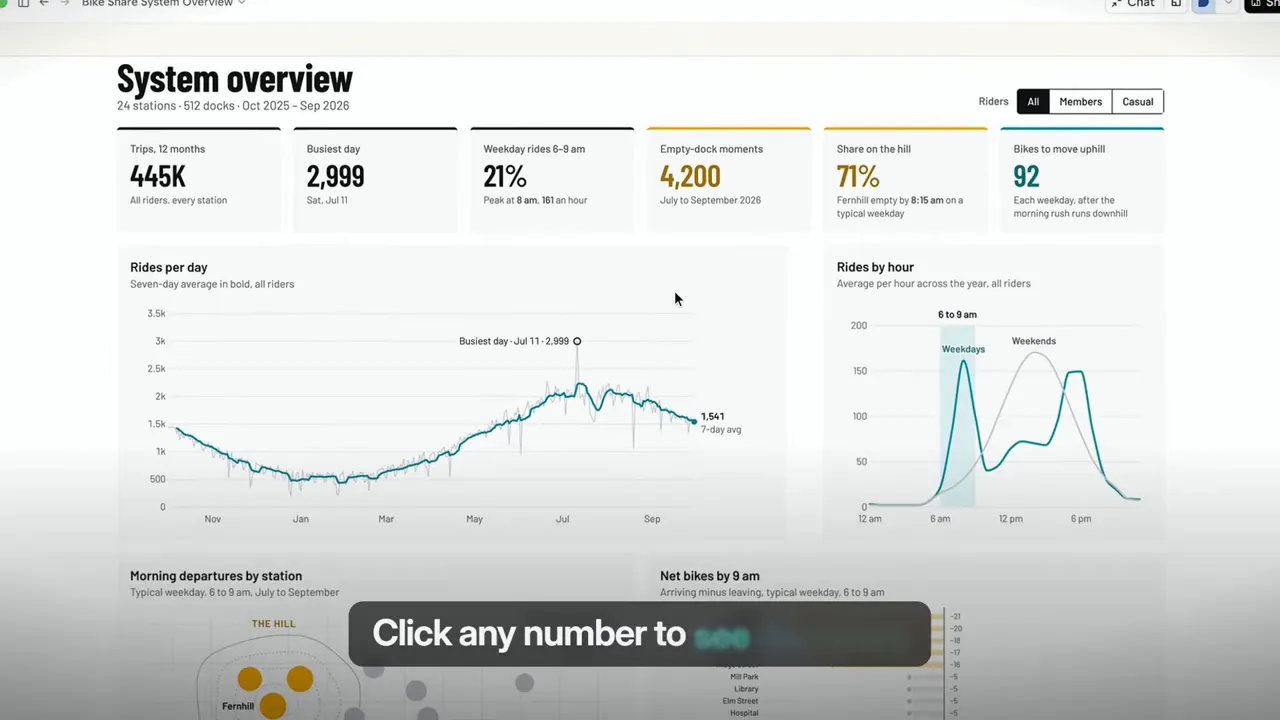
A good-looking dashboard is not enough. You need to understand where its numbers came from.
Start With One Recurring Deliverable
If you want to try this, pick one thing your team rebuilds every week. It might be a recurring report, a KPI page, or another deliverable you keep refreshing and sending around.
Give Claude a brief along these lines:
Create a shared artifact for this recurring report that my team can access through one link. Make weekly updates straightforward, and make the source of every number clear.
Then share the link instead of repeatedly resending reports, emails, and updated files.
This is where the time savings become practical. You are not just generating the content faster. You are reducing the copying, pasting, formatting, and distribution that usually comes afterward.
Brief Claude like you would brief a person
The difference between an artifact that is technically fine and one your team opens every day often comes down to the brief.
Tell Claude:
- Who it is for: Identify the people who will actually use it.
- What decision it supports: Explain what they need to decide or accomplish.
- What good looks like: Set the standards and give feedback against them.
You would not expect a new hire to build the right tool from a vague request with no context. Give AI the same clarity you would give a person.
Do not create artifact overload
There is a trap here: getting so excited that you create 20 artifacts, everyone else creates another 10, and suddenly nobody knows where to go.
That defeats the whole purpose. The goal is to make work easier and reduce overwhelm, not give everyone more places to check.
Start with something genuinely useful and keep improving it. More artifacts does not automatically mean a better system.
The Lock-In Question Is Fair
If your dashboards, training tools, documents, and planning boards all live inside Claude, are you locking your business into Anthropic?
That is a fair concern, and it was one of my first thoughts too.
Artifact content is stored on Anthropic’s infrastructure. For organization-shared work, teammates sign into Claude to access it. Anthropic clearly wants Claude to become a place where your work lives, not just a tool you visit to ask a question.
This is part of a broader pattern across AI companies. Microsoft has Copilot Pages, and Google has Canvas in Gemini. My view is that the model alone may not remain the competitive advantage. The companies also want to own the workspace around it.
Exports help, but keep your source of truth elsewhere
Artifacts offer export options, depending on the format, including Word, PDF, Google Docs, PowerPoint, spreadsheets, CSV, and HTML. That gives you a route to move the content elsewhere.
But my rule is simpler than relying entirely on an export button:
Keep the source of truth in places you control. Use artifacts as the window into it.
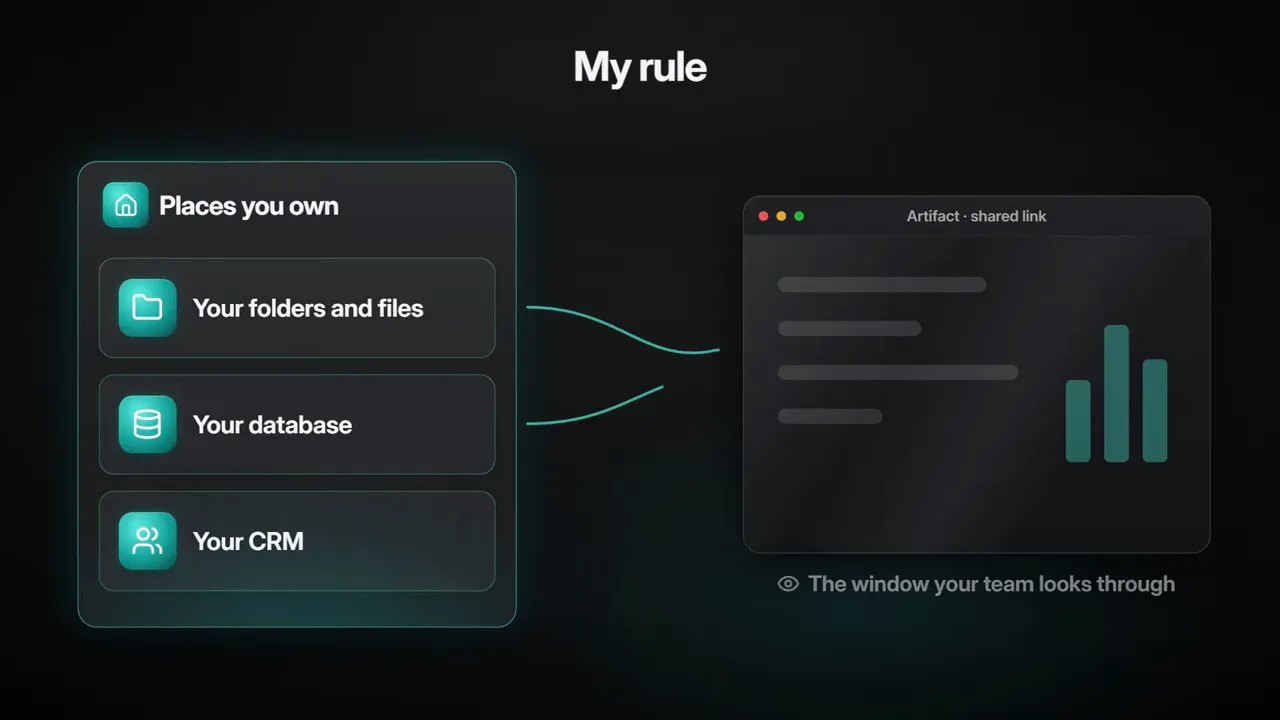
Your underlying knowledge, important data, local files, and business context should still live in your own AI operating system. Use artifacts to make that information easy to access, share, comment on, and improve.
That is how I think about the AI OS I have built: the valuable intellectual property is in the folders, files, knowledge, and processes that can move with me.
If you are building that foundation, my free AI OS kit is based on the Herk Loop: context, connections, capabilities, and cadence. It includes six skills to help establish your system’s knowledge base, clarify business priorities, and gather context through an interview process.
Build the Skill, Not Just a Collection of Claude Tools
The reason to get good at artifacts is not that one specific Claude feature will necessarily be the permanent winner.
The transferable skill is learning how to brief AI to build what your team needs, check its work, share it effectively, and get people working from a live link rather than passing files around.
Those habits carry over to another platform, or even to a custom tool you build later.
Start with one recurring workflow. Build something useful, verify it, share it, and keep improving it. Keep ownership of the knowledge underneath. Bet on the habit and the skill, not just the tool.


