Gemini 4 Neon scores above Claude Opus 5.5 on Artificial Analysis while charging 25% less per token. That is a pretty compelling reason to give it a try, especially if you already spend a lot of time and money inside Claude.
But a leaderboard win does not automatically mean you should move your workflow over. Some of the things people are building with Neon are genuinely impressive. Other comparisons show broken interactions, less complete outputs, and savings that come with a quality trade-off.
I went through the standout builds, the debugging results, and the failures. Then I sent the same prompts to Neon and Opus myself. My takeaway is simple: Neon is worth adding to your setup, but that is different from replacing Claude.
Key Takeaways
- Neon looks strongest in visual builds, targeted debugging, and large-document work.
- Lower token prices do not guarantee lower task costs when a model generates more tokens.
- Neon’s benchmark lead did not translate into consistently better outputs than Opus.
- Add Neon alongside Claude and test it on real work before replacing a reliable workflow.
The Best Gemini 4 Neon Builds Show Real Visual Ability
Most of the excitement around Neon is coming from things you can open in a browser: 3D scenes, interactive demos, games, and product interfaces. A few examples explain why.
A robotic dog built from one image
The Bugged Dev gave Neon an image of a robotic dog with a railgun mounted on its back and asked it to build the thing in 3D. There were no detailed instructions about physics or animation.
The resulting demo included 240 Hz physics, forces calculated across all four legs, and inverse kinematics to keep the feet planted as the body moved. It also supported walking, trotting, and galloping.
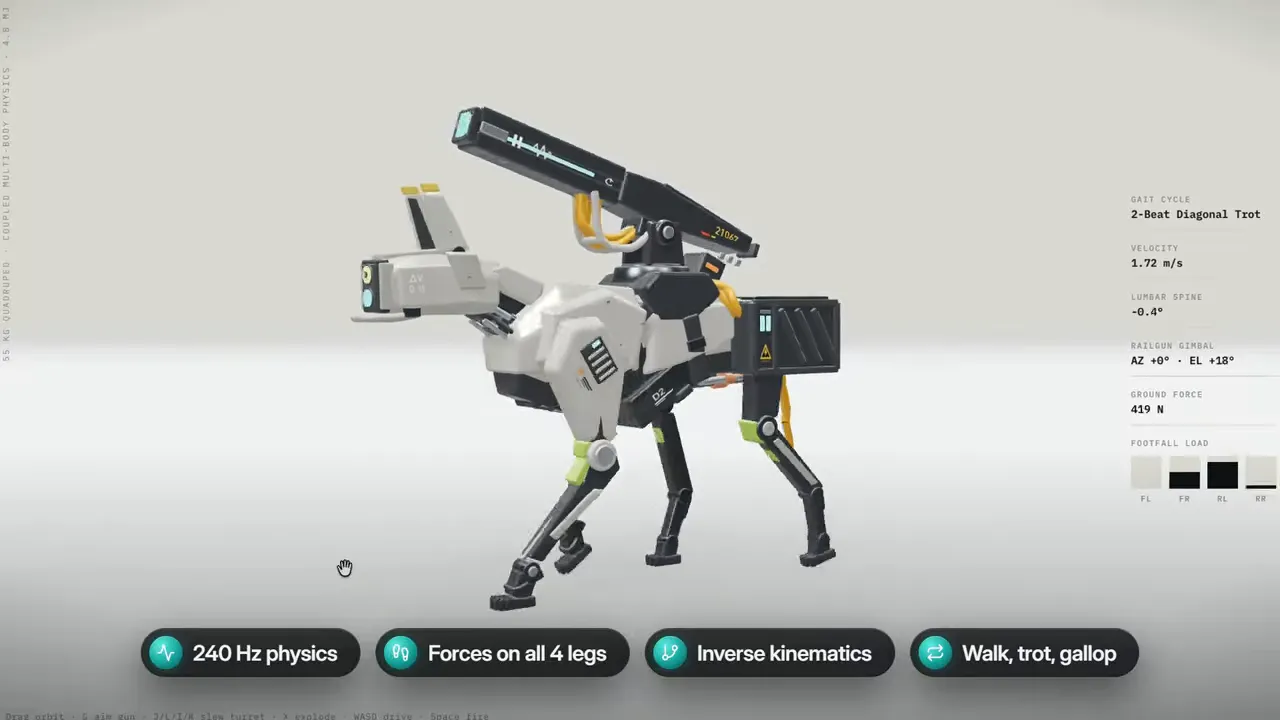
What impressed me was not just the model’s ability to recreate the shape. It connected the visual reference to the mechanics needed to make that shape move convincingly.
A still image turned into an interactive rainy scene
Ashutosh Shrivastava gave Neon one still image and asked it to animate the image in Three.js. That was essentially the entire request.
Neon downloaded a depth model from Hugging Face and ran it locally on his Mac. It used that model to determine which parts of the image were close and which were farther away, then sliced the image into layers.
The finished scene had live rain, puddles you could splash, curtains you could brush, and generated rain audio.

That is an interesting example of the model choosing its own approach. The request described the result, but Neon worked out the intermediate tools and steps needed to get there.
Seventeen interactive demos, including a destructible arena
Chubby spent a full day testing Neon inside Antigravity and produced 17 interactive demos. One of them, Terra Breaker, was a destructible voxel arena.
The request was for destruction and a reset button. Neon added three tools with different behavior. A cannon removed large chunks, while a chisel chipped away only a few blocks. The demo reportedly maintained 60 frames per second.
That distinction matters. Adding three buttons is easy. Making those buttons produce meaningfully different interactions is a better sign that the model understands the experience it is building.
Sailing ships, eclipses, and a ski simulator
Another one-prompt example produced a historical sailing ship with a clean-looking hull and water. Emily’s Eclipse Village showed a moon’s shadow moving across a voxel town, with lights switching on house by house as darkness passed over them.
There is an important caveat with Eclipse Village, though: the prompt was detailed. It specified the number of houses, the camera position, and what should happen at different points in the animation loop.
A lot of the strongest results still start with a good specification. Neon can make creative decisions, but clear direction establishes the standard it needs to meet.
Google also supplied its own showcase: a first-person ski simulator using real Mont Blanc terrain, with more than 10,000 lines of custom shaders and features such as avalanches. It is an impressive visual demonstration, but it is also a vendor-selected example. Most of us need to know how a model handles everyday work, not just a spectacular demo.
Can Neon Handle Real Coding and Debugging?
The practical debugging results are some of the more interesting evidence for Neon.
Chubby gave it three broken programs. After the fixes, all three passed their available tests:
- Booking checker: Improved from 1 of 5 tests passing to 5 of 5.
- Task scheduler: Improved from 8 of 14 to 14 of 14.
- Async loader: Improved from 10 of 16 to 16 of 16.
Those are small examples, but there was also a broader test from Paweł Huryn. He planted 105 bugs across two real code repositories and asked the models to find and fix whatever they could.
Neon, at its highest setting, scored 63. GPT-6.2 Astra scored 62.7, and Claude Fable 5.2 scored 58. Those are test scores, not a claim that Neon fixed 63% of every possible bug in real software.
I also came across a developer’s account on Hacker News describing low-level graphics work that had been stuck for two weeks despite attempts with other models. The developer reported that Neon unblocked the problem in about 20 minutes.
That is an anecdote, not a controlled benchmark. Still, it points in the same direction as the other results: Neon looks especially useful when you hand it a specific, broken thing and ask it to work through the cause.
Where Gemini 4 Neon Looks Strongest
Across the examples and tests, I see four areas where Neon deserves attention.
1. Visual builds
Interactive prototypes, 3D scenes, games, landing pages, and dashboards are the clearest starting point. This is where most of the standout examples are coming from, and where it is easy to compare the result with what you asked for.
2. Fixing and debugging
The repository test, the three repaired programs, and the graphics developer’s experience all suggest that Neon is worth trying when your current model gets stuck. You do not need to migrate an entire project to get value from a second model’s approach to one stubborn issue.
3. Large documents and long-context retrieval
Neon has a one-million-token context window. More interesting than the size alone is whether it can reliably retrieve information buried inside that context.
Google’s own long-context recall figures put Neon at approximately 95%, compared with approximately 67% for Opus. That is a large gap, but it is also Google’s benchmark, so I would take it with a grain of salt.
It does line up with the work Google is positioning the model for: spreadsheets, PDFs, billing statements, and other document-heavy knowledge work. If that is a big part of your workflow, it is worth testing with your own material.
4. API pricing
In the Artificial Analysis results I reviewed, Neon scored 61 on the intelligence index, compared with 59 for Opus 5.5. Fable 5.2 remained higher at 65.
The reported cost per task for running the index was:
- Gemini 4 Neon: $6.44.
- Claude Opus 5.5: $10.04.
- Claude Fable 5.2: $26.54.
I still consider Fable the smartest of those models, and it led that leaderboard. But Neon getting reasonably close for roughly a quarter of the benchmark task cost is interesting.
Just do not confuse those benchmark costs with a guarantee about your own jobs. That distinction showed up pretty quickly in the comparisons.
Where Neon Falls Short Against Opus
KC sent the same request to Neon and Opus 5.5: build a watch configurator.
- Opus: Cost $2.74 and produced a 42-part watch.
- Neon: Cost $1.86 and produced a 9-part watch with broken interactions.
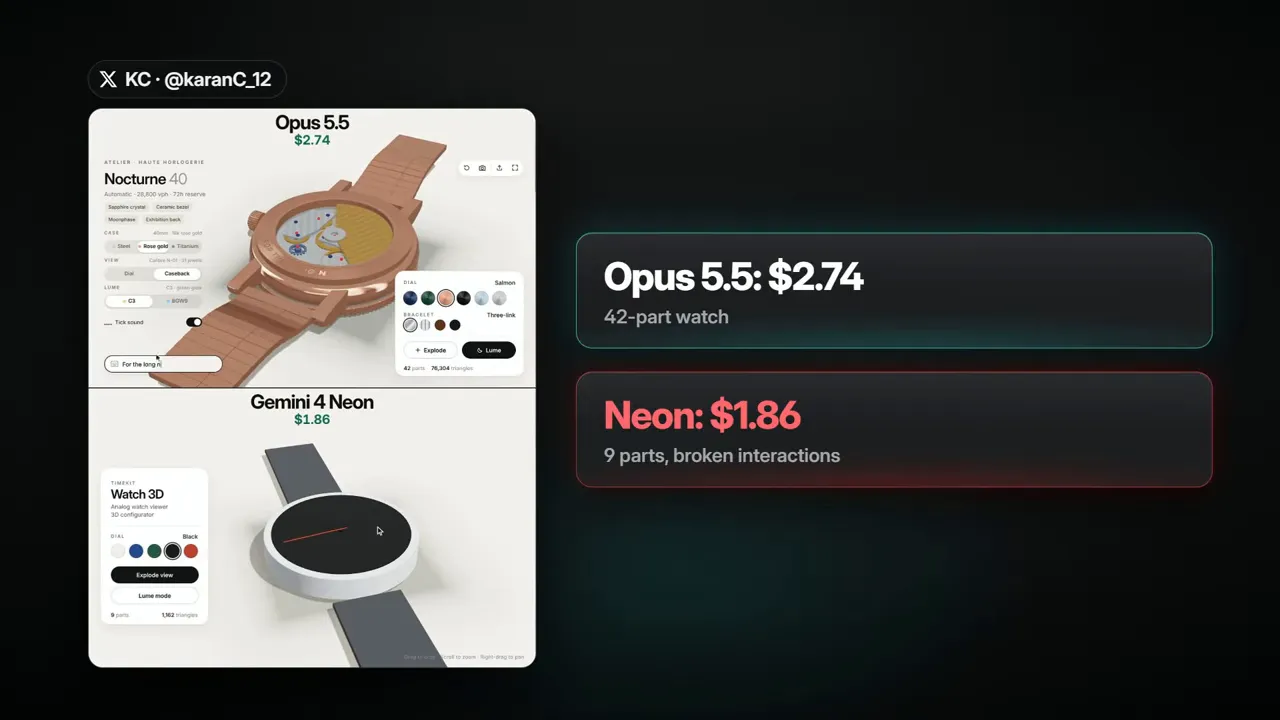
Yes, Neon was cheaper. But those were not equivalent results. A lower bill is not much of a win if the output is less complete and the interactions do not work.
Another comparison put Neon at about $3.50 and Opus at about $7.20. The tester appreciated some of Neon’s detail but still strongly preferred the Opus output.
Some of that preference is subjective, especially with visual work. The broken interactions are a more concrete problem. Either way, these examples are a useful counterweight to the best-case demos.
The right move is to put Gemini into your own setup and see how it handles the tasks, instructions, and workflows you actually use.
My Gemini 4 Neon vs. Opus 5.5 Test
I had Claude send identical prompts to Neon and Opus 5.5 through their APIs, using default settings on both. This was a small practical comparison, not an exhaustive evaluation.
Test 1: A 3D coastal city at sunset
The first request was for a stylized 3D coastal city with a lighthouse, animated waves, moving cars, and a slowly orbiting camera.
Neon leaned into a cinematic look, with the sun, water, and surrounding hills doing a lot of the visual work. Opus produced something that felt more like a structured city, with a street grid, cars, and a sweeping lighthouse beam.
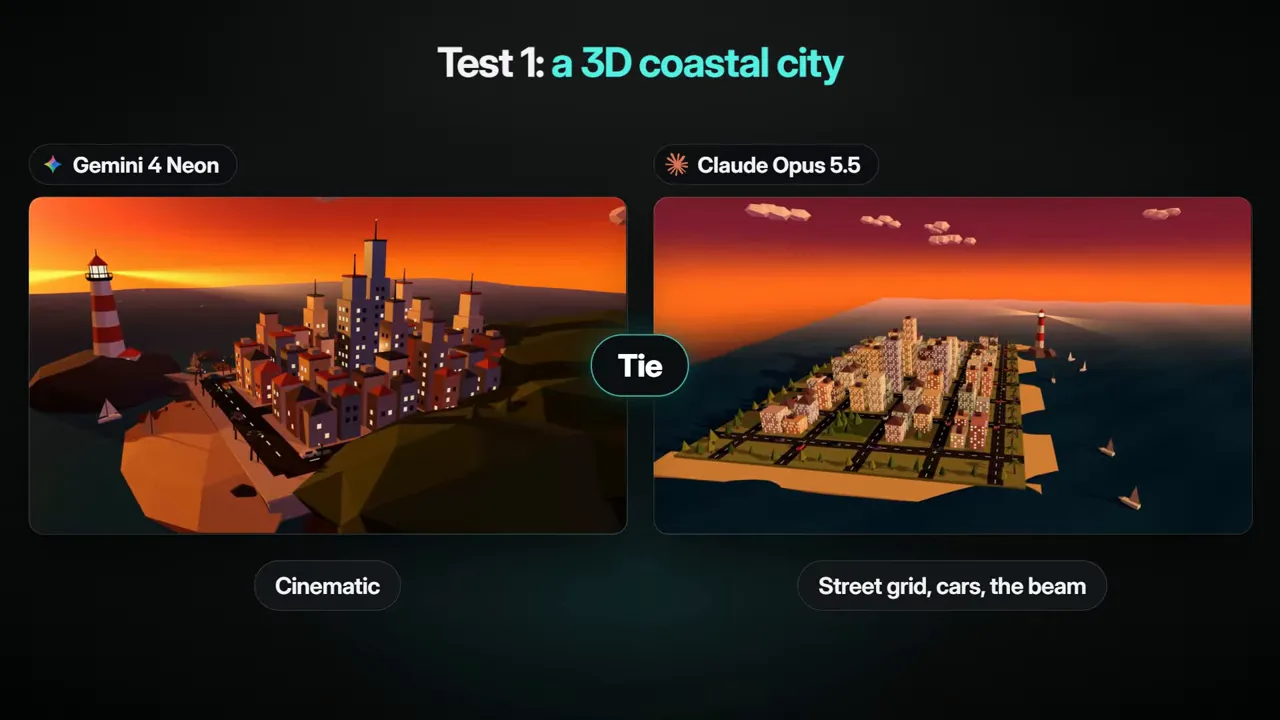
I called it a tie. They interpreted the same request differently, and I could see reasons to prefer either style.
Test 2: A coffee subscription dashboard
The second request was for a dashboard for a coffee subscription company. Again, I would call it a tie.
Both outputs looked like plausible products, and both kept their numbers consistent across the dashboard cards. Neither gave me a clear reason to declare it the winner.
The actual time, token usage, and cost
The city test is where the pricing story got more interesting:
- Neon: Took 3 minutes and 17 seconds, wrote about 25,000 tokens, and cost $0.37.
- Opus: Took 2 minutes and 16 seconds, wrote about 16,000 tokens, and cost $0.32.
For the dashboard, the costs were essentially equal: $0.40 for Neon and $0.41 for Opus.
Cheaper per token does not automatically mean cheaper per completed job. In the city test, Neon used more tokens and took longer, which more than offset its lower token price. Opus was more efficient on that particular task.
That does not erase Neon’s pricing advantage. It means you need to measure the total bill for the output you need, not just compare the published rates.
Trick questions and hallucinations
I also tried a few smaller checks:
- A question about a pandas method that does not exist.
- A demanding formatting test.
- A logic puzzle.
Both models correctly rejected the nonexistent pandas method instead of inventing instructions. Both also passed the formatting and logic tests.
I did not run into a hallucination problem in this small sample. But a handful of prompts is very different from hours of agent execution, especially when agents are delegating to subagents. These results do not establish long-run reliability.
Gemini 4 Neon Pricing: The Details That Matter
The standard API rates shown for Neon were $3 per million input tokens and $15 per million output tokens, compared with $4 and $20 for Opus 5.5. That is the basis for the 25% lower per-token pricing.
Neon also offered batch pricing at half its standard rates: $1.50 per million input tokens and $7.50 per million output tokens. If you run a lot of API jobs, that is worth factoring into your tests.
There is also a distinction within the Gemini 4 lineup. The pricing schedule presented for Carbon listed introductory rates of $2 per million input tokens and $10 per million output tokens through November 30. From December 1, those rates were scheduled to double to $4 and $20, while Neon remained at $3 and $15.
Under that schedule, Neon becomes the lower-cost way to get roughly Carbon-level benchmark performance after the introductory period. As with any model comparison, the relevant question is still what your actual workload costs.
Should You Switch From Claude to Gemini 4 Neon?
For most people, my answer is: add Neon next to Claude before you consider replacing Claude.
I would try Neon now if you are:
- Building visual prototypes, landing pages, interactive demos, or 3D experiences.
- Stuck on a specific bug that your current model cannot resolve.
- Working through a large collection of documents.
- Running enough API jobs that task-level cost differences matter.
Personally, I am keeping Claude Code as my home base for day-to-day work and long agent runs. If a workflow is working well, I do not see a reason to tear it up because another model moved ahead on one leaderboard.
I will still experiment with Gemini on different projects and delegate work when I want another opinion or get stuck. Having Codex review Claude’s work, or Gemini review Codex’s work, can be a powerful way to use the differences between models.
Neon is impressive. The visual ability is real, the debugging evidence is promising, and the pricing deserves attention. But the useful question is not whether it universally beats Opus. It is whether it does your specific job better, faster, or more cheaply. Test that before you move anything important over.


