Codex Ultrafast is seriously fast. I asked it what I covered in this week’s community Q&A, and it found the right call, worked through 54 minutes of discussion, and gave me a summary in 19 seconds.
That’s impressive. But speed is only one part of the equation.
I tested Ultrafast against Standard using GPT-6 Astra on two very different tasks: editing a short reel from my Google trip and creating a resource guide from a YouTube video. I wanted to know three things: how much time it saved, whether the output was better, and how much of my weekly usage it burned through.
My takeaway: Ultrafast is a useful option when you genuinely need speed, but I would not make it my default. One task consumed 17% of my weekly allowance on the $500/month plan. That changes how exciting a faster result feels.
Key Takeaways
- Ultrafast saved time in both tests, but consumed three to 4.25 times as much weekly usage.
- The reel improved creatively, while the resource guides showed no meaningful quality advantage for Ultrafast.
- I would reserve Ultrafast for urgent deadlines rather than make it my default speed setting.
What Is Codex Ultrafast?
Ultrafast is a speed option in Codex, alongside Standard and Fast. At the time of my testing, it was available with GPT-6 Astra on the $500/month Pro plan, but not on the $100 or $200 monthly plans. It was also available through the API.
The advertised performance was:
- Up to eight times faster than Standard.
- Four times faster than regular Fast mode.
- Up to 300 tokens per second.
That’s faster than a person can comfortably read. Support for GPT-6.1 Soul was also announced as coming soon. Since Soul is cheaper, I’m interested in whether that combination will make Ultrafast less painful on usage.
The important distinction is that an advertised speed increase does not necessarily mean every complete task finishes eight times sooner. My two tests landed at very different points, and the usage trade-off was different for each one.
Test 1: Turning 145 GB of Google Trip Footage Into a Reel
The first task was a fairly complex creative job. I asked Astra to create a 60-second showreel from my recent trip to Google in San Jose.
I supplied:
- Two recordings totaling about 11 minutes of me reflecting on the trip.
- A folder containing more than 145 GB of raw footage.
- A request for a vertical 9:16 edit suitable for Instagram Reels, TikTok, or YouTube Shorts.
This was not just a request to shorten one clip. It had to work through a lot of material, select useful B-roll, and pull together a story from my reflections and the footage.
I ran both versions with Extra High reasoning, using Standard for one and Ultrafast for the other.
The Speed and Weekly Usage Results
- Ultrafast: 19 minutes, 13 seconds, consuming 17% of my weekly usage.
- Standard: 49 minutes, 53 seconds, consuming 4% of my weekly usage.
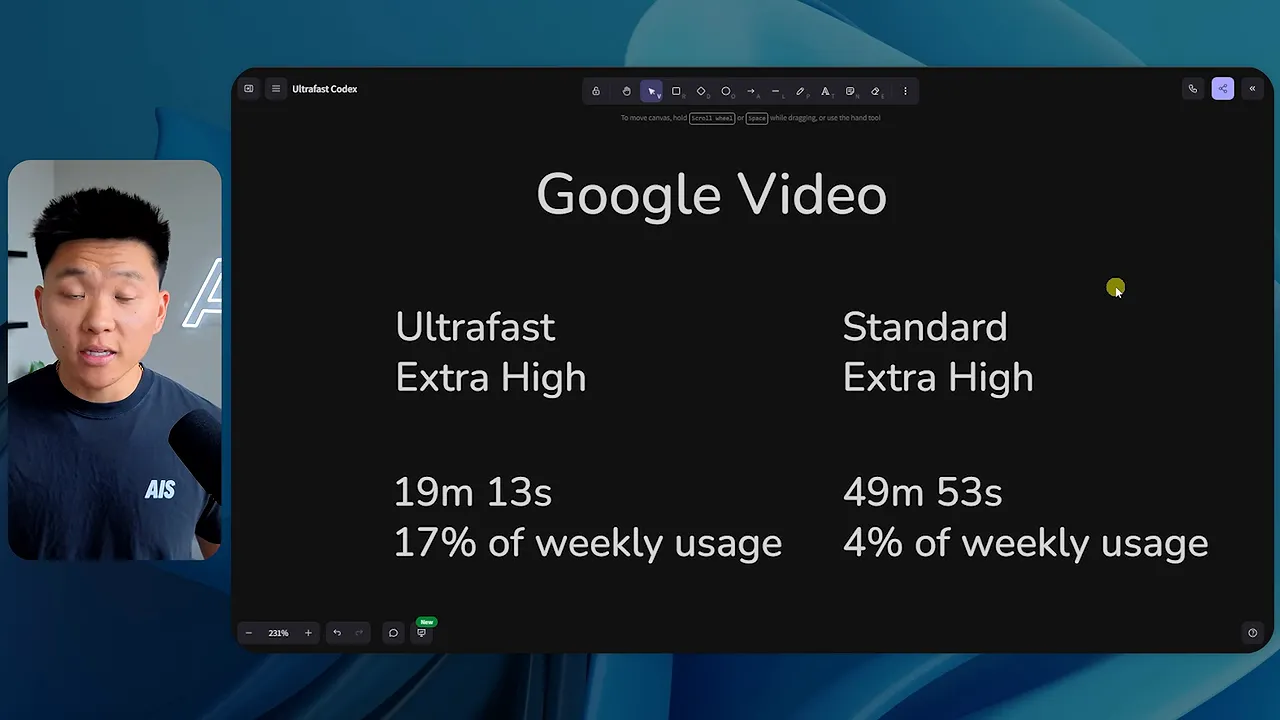
Ultrafast finished roughly 2.6 times faster. That is a meaningful time saving, but it is nowhere near eight times faster for this particular task.
The usage difference was much harder to ignore. Seventeen percent of the weekly allowance on a $500/month plan is a lot to spend on a single run. Standard used 4%, so the faster version consumed 4.25 times as much weekly usage.
Which Reel Was Better?
I preferred the Ultrafast edit. It felt more aligned with Google’s branding, and the story held together better.
The Standard version covered plenty of the experience: the campus atmosphere, the colorful buildings, the bikes, the soccer demonstration using Pixel phones, and our conversations about AI. It also included the point that people still need to provide judgment, boundaries, and a clear definition of done.
But some of its cuts interrupted my sentences before I had finished speaking. That made the edit feel less natural, even when the individual clips were relevant.
The Ultrafast version did a better job connecting the campus energy and culture with the practical AI demonstrations and the broader message about AI skills. It moved from the environment and people into examples involving retail and inventory, then into why those skills matter even outside technical roles.
The central idea came through more clearly: find the area you care about and understand how AI can help you do more within it.
Honestly, I was impressed that it could pull a coherent story out of that much raw material at all. There was a lot of B-roll to sort through, and the Ultrafast version felt more intentional.
What surprised me was how different the two results felt. They used the same model and the same reasoning effort, yet the Standard edit felt noticeably weaker to me.
That does not establish that Ultrafast always produces better creative work. It tells me that in this run, I liked its output more. Even so, I would not normally choose it just to save half an hour at that usage cost.
Test 2: Creating a YouTube Resource Guide
The second task was closer to something I do regularly: turning a YouTube video into a written resource guide.
I used my comparison of OpenAI Dots and Meta Muse as the source, gave both runs the same prompt, and used the same skill to produce the guides. Both runs used High reasoning.
This was a much more contained job than assembling a reel from a large footage library, and the speed difference was much closer to the advertised figure.
- Ultrafast: 1 minute, 43 seconds, consuming 3% of my weekly usage.
- Standard: 13 minutes, 3 seconds, consuming 1% of my weekly usage.
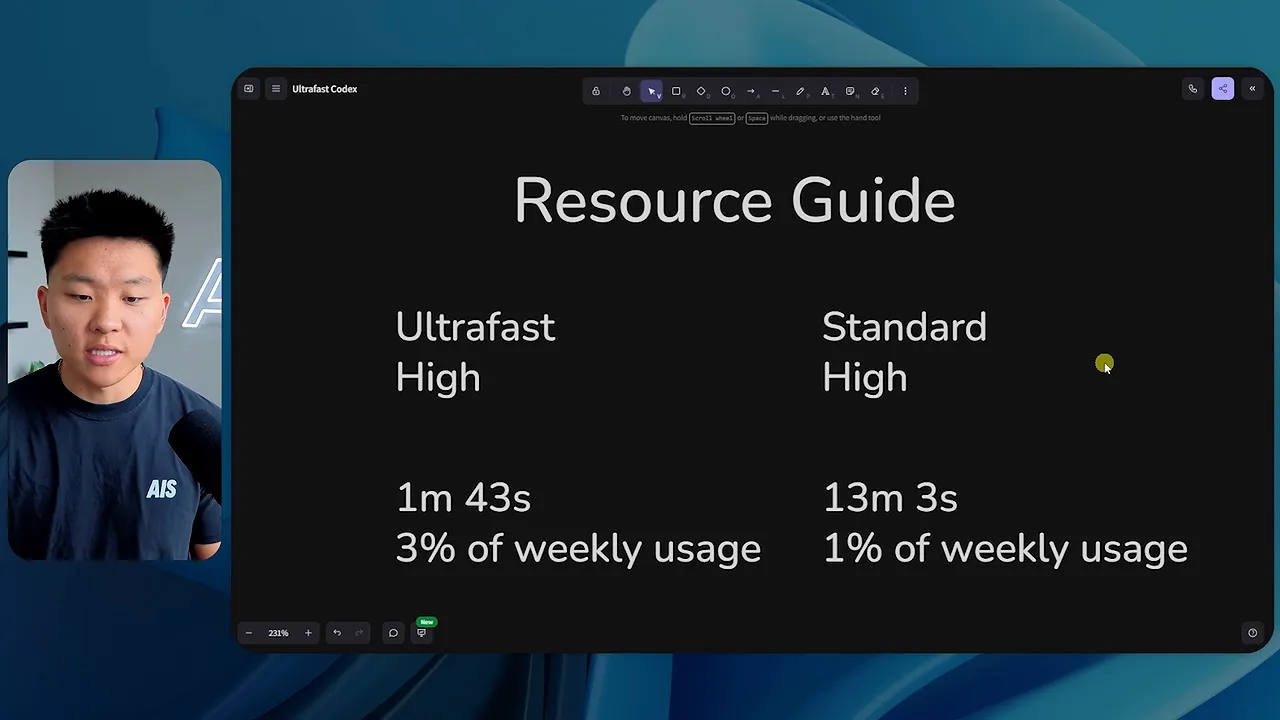
Here, Ultrafast was roughly seven to eight times faster. It saved a little over 11 minutes and consumed 3% rather than 1% of the weekly allowance.
That is still triple the usage. But the absolute difference is two percentage points, which feels very different from spending an additional 13 percentage points on the reel.
Were the Resource Guides Meaningfully Different?
Not really. Both guides ended up being seven pages, with similar branding and a very similar structure. That made sense because they were built with the same skill.
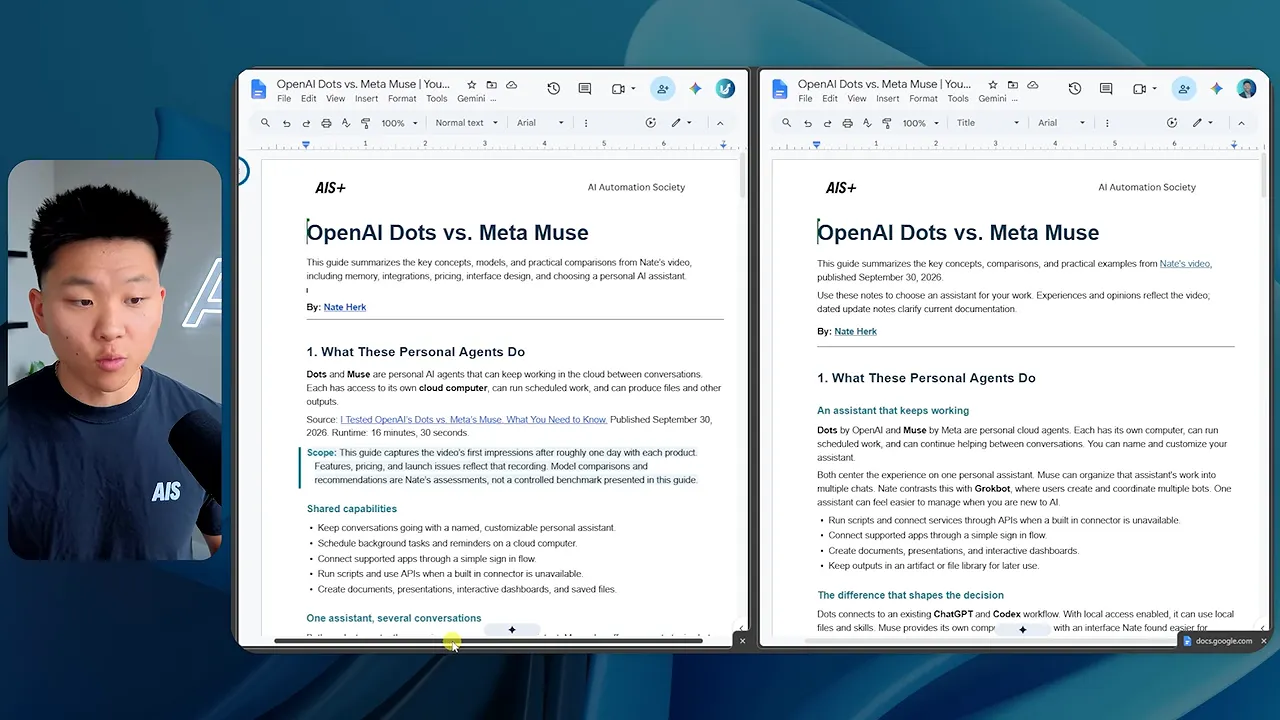
Both included a source-video link near the top and organized the comparison around similar themes:
- What the personal agents do.
- Memory, context, and personalization.
- Communication channels and ecosystem.
- Working inside the products and evaluating their strengths.
- Key takeaways.
There were small differences. The Ultrafast guide had a longer takeaway section. The Standard guide included a useful-links section with the source video and supporting product documentation. I did not find equivalent additional links in the Ultrafast version.
Both also included the same community reference at the bottom, consistent with the guide format.
I would put both outputs at roughly a nine out of ten. Neither was meaningfully better overall, and there was even an argument that Standard had a slight edge because of the extra reference links.
For my normal workflow, I’m happy to wait 13 minutes and use 1% of my allowance instead of waiting under two minutes and using 3% for essentially the same result.
What These Tests Actually Tell Me
Ultrafast is definitely faster. The question is whether the time saved is valuable enough to justify the additional usage.
The reel and resource guide show why I would evaluate that task by task:
- For the complex reel: roughly 2.6 times faster, 4.25 times the usage, and an output I preferred.
- For the resource guide: roughly 7.6 times faster, three times the usage, and no meaningful quality advantage.
The quality results did not point in one consistent direction. Ultrafast won the creative comparison for me, but the written guides were effectively tied.
The usage multiplier also needs context. Going from 1% to 3% may be an acceptable trade when a deadline is close. Going from 4% to 17% is a much bigger decision, even though both involve paying several times more usage for speed.
For smaller tasks that need less input, back-and-forth, thinking, and verification, I can see Ultrafast being useful. In my limited testing, the increased usage was in the general range of two to four times, with the reel coming in a little above that. As the underlying task gets bigger, that multiplier becomes much more expensive in absolute terms.
When I Would Actually Use Ultrafast
If I had five minutes before a meeting and needed something prepared immediately, I would consider it. That is the kind of situation where saving 11 minutes could genuinely matter.
Most of the time, though, that is not how I work in Codex or Claude Code. Especially on more complex tasks, I like to let the agent run, review the result, and iterate. I do not need every task to finish as quickly as possible.
I already use regular Fast mode quite a bit, including with Soul. It does use more allowance than Standard, but in my day-to-day experience it has not felt nearly as aggressive as Ultrafast.
My practical approach is:
- Use Standard when I can let a task run and want to preserve usage.
- Use Fast when I want a speed increase without going straight to Ultrafast.
- Reserve Ultrafast for situations where the deadline makes the extra usage worthwhile.
If you are constantly hitting your usage limits, the $500/month plan may be worth considering for your broader workload. Having Ultrafast available is a nice extra option. But I would not upgrade purely because the maximum advertised speed sounds exciting.
There is also a bigger systems question here. If I constantly need the most expensive speed setting because I am running out of time, I would rather improve the workflow that keeps putting me in that position.
Ultrafast is a useful emergency option, not a substitute for a good system. I’m glad it exists. I just expect to use it when my back is against the wall, not every time I open Codex.


