You do not need to be a developer to get value from Codex. Most of what I use it for is not building software. It is content, research, business operations, and all the little tasks that otherwise eat up my day.
The big shift is understanding that Codex is not just a chatbot. Give it useful context, connect the tools it needs, and teach it your workflows, and it starts behaving much more like a personal assistant.
These 18 concepts explain how that works. I have grouped them into four parts: foundations, environments, control and customization, and tools and scale. The model names and available features may change, but these are the ideas that make the whole system click.
Table of Contents
- Key Takeaways
- Part 1: Foundations
- Part 2: Environments
- Part 3: Control and Customization
- Part 4: Tools and Scale
- Build an Operating System, Not a Collection of Chats
Key Takeaways
- Projects and AGENTS.md give Codex reusable context, operating rules, and directions to relevant information.
- Skills turn successful processes into repeatable workflows that improve through specific feedback.
- Model choice, reasoning effort, and permissions control the balance between capability, usage, and autonomy.
- Subagents, scheduled tasks, and voice help coordinate work beyond a single chat.
Part 1: Foundations
1. Projects: Give Your Work a Home
If you have used ChatGPT or Claude in a browser, you probably know the routine. You start a new chat, explain your business, explain what you are working on, and try to bring the AI up to speed. Then you do it again in the next chat.
A Codex project gives that work a persistent home. At its simplest, a project is a collection of folders and files that Codex can work with.
My main project is called Herk 2. I think of it as my AI operating system. It contains business knowledge, active projects, YouTube material, operating rules, and other context that helps Codex understand my work. I keep separate projects for things like Hyperframes and my trading challenge.
That organization makes a simple request much more useful. When I ask for a rundown of the past month, Codex can use the project material and accessible session history to pull together themes such as:
- Improvements to my AI operating system.
- YouTube content and strategy.
- AI model testing and demonstrations.
- Apps, websites, and product experiments.
- Branding and business operations.
The value is not that a folder magically makes the model smarter. It is that the folder gives the agent relevant information to work from instead of forcing you to explain everything from scratch.
2. AGENTS.md: Set the Ground Rules
AGENTS.md sounds more technical than it is. The .md just means Markdown. It is a readable text file containing instructions for the project.
My file explains the agent's role: help me spend less time on operations so I can focus on making YouTube content. It also includes operating preferences, desktop safety guidance, and something I consider especially important: a routing map.
When your project contains hundreds or thousands of files, you do not want the agent searching blindly every time. A routing map tells it where to go:
- Business information belongs in the wiki.
- Corporate structure has its own section within that wiki.
- Voice and writing guidelines live in a specific location.
- Course knowledge and active projects have their own folders.
Codex loads applicable project instructions as context for its work. Put the things you want it to know consistently in AGENTS.md, and point it toward more detailed material when needed.
Different projects can have different rules. My general business assistant should not necessarily behave the same way as an agent working inside a video-rendering project. OpenAI's AGENTS.md guidance is a useful reference for how these instructions are discovered.
3. The Agent Loop: How Codex Gets Things Done
Codex, Claude Code, and similar tools are often called agent harnesses. The harness gives the AI model access to tools and manages the process of using them.
The basic agent loop looks like this:
- Understand the request and decide what to do next.
- Use a tool, read a file, run a command, or take another action.
- Inspect the result.
- Continue working or return an answer.
That is the difference between generating a plausible response and actually doing work.
For example, I asked Codex to find my most recent YouTube upload and select three funny comments. It first oriented itself using my project information, then used a command to retrieve YouTube data, and finally returned the comments.
The results included jokes about being unusually excited to lose money trading with AI, instructing an AI to take only profitable trades, and being perfectly capable of losing money without help.
You can expand the activity details to inspect commands, tool calls, and progress updates. This is a great way to learn how your setup works. You do not need to understand every command immediately. Start by noticing what information it reads and which tools it needs.
You may also see files such as memory.md. In my setup, these hold useful remembered context, while AGENTS.md primarily establishes rules and routes the agent to information.
4. /goal: Define the Outcome, Not Every Step
The /goal command is one of my favorite ideas in agentic AI. It sets an objective for Codex to keep pursuing, rather than treating the request as a single exchange.
Agents are very goal-oriented. If one approach fails, they can try another. But the quality of the goal matters.
Objective completion criteria are easier to verify than vague instructions. Asking for a report supported by 257 sources gives the agent a measurable target. Asking it to continue until it feels satisfied leaves much more room for interpretation.
A real example from my workflow was creating motion graphics with Hyperframes, which lets coding agents build HTML and render it as video. I specified one intro scene and 18 concept cards, along with the other creative requirements.
Codex produced the animations and reported that it had visually checked them using screenshots before finishing. That is a much more useful outcome than simply generating files and assuming they look right.
My approach is simple: when the task is not especially risky, give the agent a clear goal and some room to work. Micromanaging every action can limit the very capability you are trying to use. That does not mean success is guaranteed, but it does mean you should define what done looks like.
Already Using Claude Code? Keep Your Knowledge Portable
You do not have to abandon an existing file-based setup to try Codex.
When I moved my Herk 2 project over from Claude Code, I asked Codex to inspect the project, consult its documentation, and make the setup Codex-ready. That involved creating an AGENTS.md counterpart to my CLAUDE.md, copying reusable skills into the appropriate agents directory, and adapting settings where needed.
The important point is not to blindly copy every configuration file. It is to let Codex help map the existing structure to its own conventions.
Your knowledge should live in portable files, not only inside one tool. That makes it much easier to move between agent harnesses without rebuilding your operating system from zero.
Part 2: Environments
5. Local, Cloud, and Remote: Know Where Work Happens
Local means something lives or runs on the computer you are using. Cloud means it lives or runs on a remote service.
A document saved only on your desktop is local. A document stored in Google Drive is cloud-based. A local folder synchronized through OneDrive can have both a local copy and a cloud copy.
This distinction also applies to things Codex builds. My motion graphics project included a small site for browsing the generated videos. It ran at a local address such as 127.0.0.1:8008.
That looks like a shareable web address, but it is not a public website. 127.0.0.1 points back to the device opening it, and the port identifies a service on that device. If I send you that address, your browser looks on your computer, not mine.
So if someone excitedly shares a localhost link to their new app, there is a good chance nobody else can open it.
Codex also distinguishes between local sessions and cloud work:
- Local sessions work with files on your machine, subject to the permissions you grant.
- Cloud sessions work in a remote sandbox, with a different environment and potentially different controls.
I mostly work locally because I want Codex working directly with my files. But local does not mean I have to sit at my desk.
In the ChatGPT mobile app, the Remote area lets me access my desktop Codex conversations. I can continue the same thread from my phone while the desktop machine remains on and reachable.
For example, if I left a file on my desktop, I can ask Codex to email it to me, assuming the necessary email connection is configured. The work still happens on the desktop. My phone is simply the remote control.
6. Worktrees: Experiment Without Disturbing the Main Work
A worktree gives you a separate working directory for parallel work in a Git repository. The beginner-friendly way to think about it is an isolated workspace where you can test changes without immediately changing your main working area.
Suppose you are changing an application's onboarding flow while other people are working on the main version. A worktree lets you develop and test that change separately. You can later bring the relevant changes back into the main branch.
This is especially useful for software projects, risky experiments, and parallel development. The Git worktree documentation explains the underlying mechanism.
For everyday knowledge work, I barely think about worktrees. You do not need to master branching before asking Codex to help with research or content. Just know what the option means when it appears, and understand why Codex might recommend an isolated workspace for a particular task.
7. .codex: Understand Project and Global Settings
The .codex directory holds configuration and related Codex files. The key distinction is scope.
- Project scope: settings and resources associated with one project.
- User scope: settings and app data associated with your user account across projects.
In my project-level directory, I have items such as agent definitions, workflows, and a config.toml file. My user-level Codex directory also contains things such as sessions, memories, and automation data.
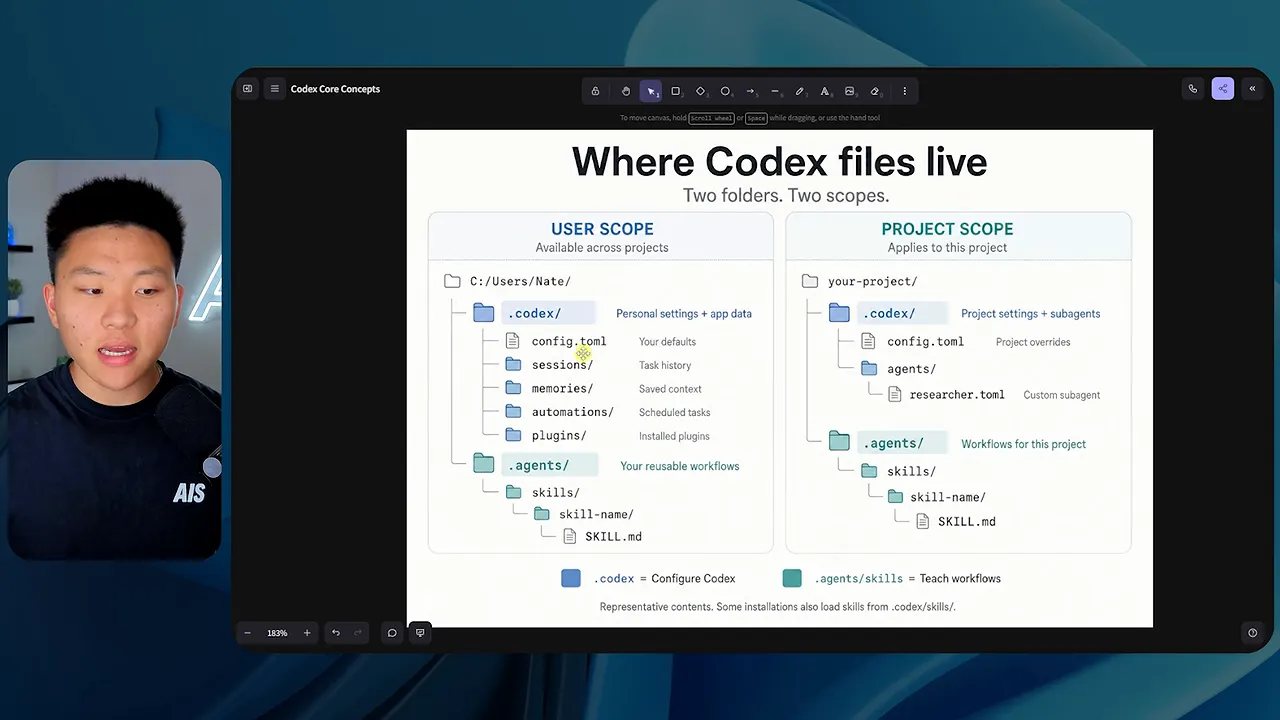
You do not need to constantly maintain these directories. It is simply useful to know they exist, especially when deciding whether a setting should apply everywhere or only inside one project.
And if you are unsure, ask Codex. It can inspect the setup and consult its documentation rather than making you guess which file belongs where.
Part 3: Control and Customization
8. Models, Tokens, and Usage: Match Capability to Cost
You can choose a model when starting a chat and, in the setup I use, change models between messages. Different models have different strengths and consume different amounts of usage.
The most capable model is not automatically the right choice for every task. A difficult planning problem may justify it. Writing a routine email probably does not.
To understand the cost side, you need to understand tokens. A token is a piece of text, not necessarily a whole word. For English text, a rough rule of thumb is about four characters or three-quarters of a word per token.
Words can split into multiple tokens, and punctuation can be tokenized separately. The OpenAI tokenizer lets you paste text and see the breakdown. In my example, a paragraph containing 274 characters used 56 tokens.
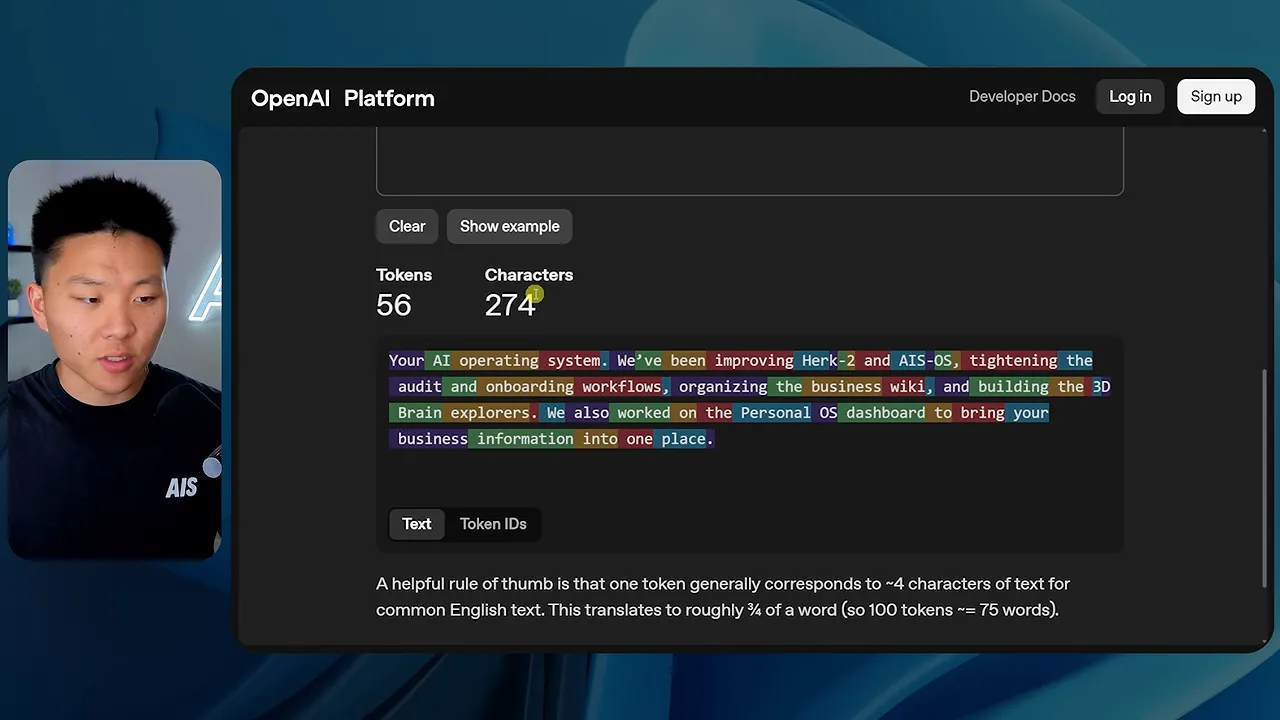
There are two important directions:
- Input tokens: material supplied to the model, including prompts and documents it reads.
- Output tokens: material the model generates, including responses and model reasoning where billed.
API pricing typically quotes separate prices per million input and output tokens. One pricing example I used was $10 per million input tokens and $50 per million output tokens. Treat those as an illustration of the pricing structure, not a permanent rate.
API billing and Codex subscription usage are different things. Programmatic API calls are billed under API pricing. Included Codex usage draws against your subscription allowance. More expensive models generally consume that allowance faster.
In my own heavy-use comparison, I estimated that fully using my weekly allowances on a $200 monthly subscription could represent roughly $14,000 of API-priced inference over a month. That was my estimate for that setup, not a guaranteed conversion or a promise about every plan.
If you exhaust included usage, the interface may offer additional Codex credits. Check the current model options, limits, and credit terms in your account rather than assuming a fixed relationship between messages, tokens, and credits.
9. Effort and Fast Mode: Separate Depth From Speed
Choosing a model is only one control. You can also choose how much reasoning effort it applies.
Available levels vary, but the setup I demonstrated included options from low and medium through higher-effort modes. Higher effort gives the model more room to work through a problem, which can improve difficult results while increasing usage.
This is also why model benchmarks need context. The same model can perform differently when tested at different effort levels.
My practical recommendation is to experiment with both settings:
- Use a less expensive model and modest effort for routine writing.
- Try a balanced model at medium effort for general knowledge work.
- Increase capability or effort when the task genuinely needs deeper reasoning.
Fast mode is a separate tradeoff. In the demonstrated setup, it offered roughly 1.5 times the speed while consuming more usage. It is useful when speed matters, but it can use up your weekly allowance more quickly.
10. Permissions: Decide How Much Autonomy to Allow
Permissions control how freely Codex can act. That matters because an agent can do more than answer questions. It may edit files, access the internet, and interact with connected services.
The interface I use offers three broad approaches:
- Ask for approval: pauses for approval on actions such as accessing the internet or editing files outside the allowed workspace.
- Approve for me: delegates approval decisions while escalating actions detected as unsafe.
- Full access: allows much more autonomous action with fewer interruptions.
I think of full access as the “YOLO mode,” but that is not where a beginner needs to start.
Starting with approval prompts helps you understand what the agent is doing. You get familiar with its commands, browser access, and file operations before deciding how much freedom to grant.
You can also ask Codex to help configure more granular restrictions. The important thing is to make your safety boundaries explicit, especially around deletion, external actions, and sensitive data.
11. Skills: Turn a Good Result Into a Reusable Workflow
Skills are one of the most useful concepts here. A skill is a reusable recipe for doing a task.
Think about making chocolate chip pancakes. Once you find a recipe you like, you do not reinvent it every morning. If the pancakes burn, you update the recipe to reduce the cooking time.
That is how I work with Codex skills:
- Do a task and get a result worth repeating.
- Save the process as a skill.
- Run it again.
- Give specific feedback and update the skill.
For example, I gave Codex a local video file and asked for a YouTube description, timestamps, and a LinkedIn post. Then I asked it to turn the material into an X article and save it as a draft.
It knew how to include a title, thumbnail, and screenshots because I had already taught those workflows through skills. It combined my description, timestamp, LinkedIn, article creation, and formatting skills rather than improvising the whole process.
You can invoke skills through natural language, and available skills can also appear through slash commands. The real benefit is consistency: feedback improves the reusable process instead of disappearing into one finished conversation.
12. .agents: Where Your Skills Live
The .agents folder is closely related to that skill system. Like configuration, skills can have project scope or user scope.
A project-level skill belongs to a particular workspace. A user-level skill can be available across projects.
Inside a skill directory, the central file is SKILL.md. It includes metadata such as the skill's name and when it should be used, followed by the instructions.
My YouTube description skill is simple. It tells Codex to write a short paragraph of two to four sentences, avoid bullets and em dashes, identify the core topic, and keep the description focused.
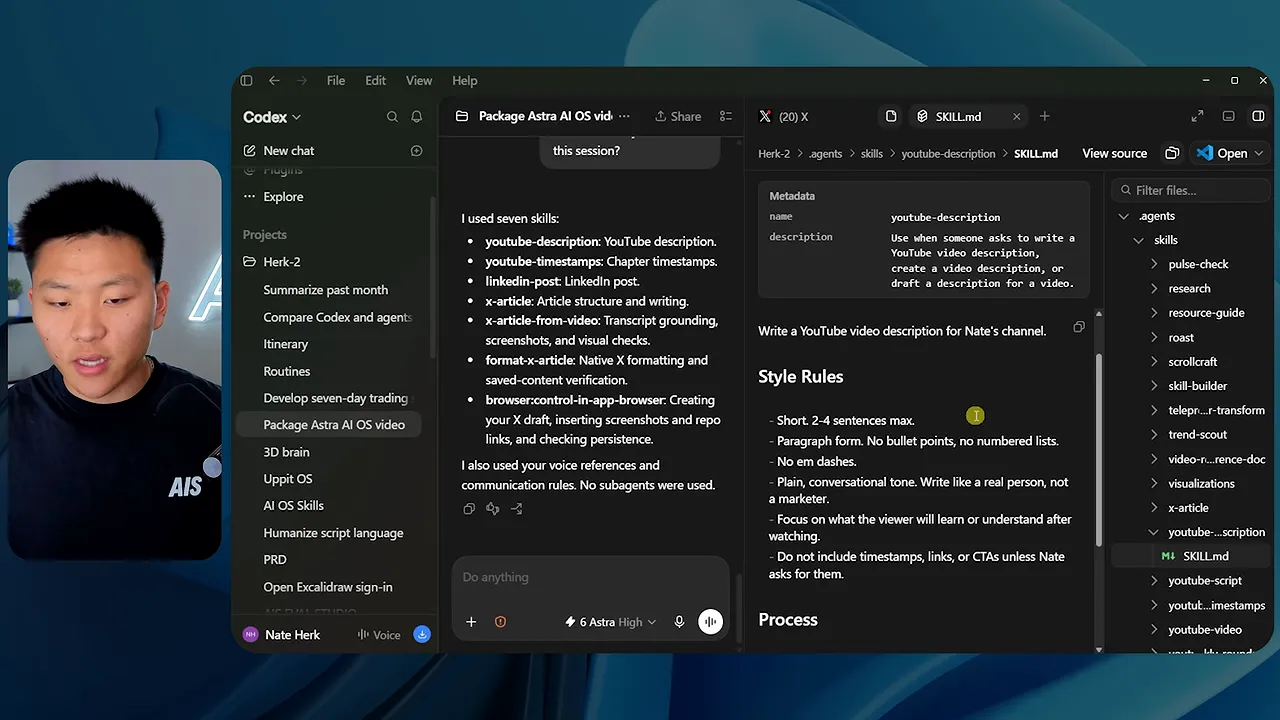
Other skills are much more detailed. My X article workflow has more steps, formatting requirements, and references.
Skills can point to other skills, agent definitions, Python files, context documents, and writing guidelines. That lets you keep shared material, such as your voice guide, in one place instead of copying it into every workflow.
13. Plugins: Connect the Apps You Already Use
Plugins are where a lot of the practical value shows up. In the Codex desktop app, you can browse integrations and connect supported services.
My installed tools include Alpaca, Gmail, ClickUp, Clay, Google Drive, GitHub, and Canva. The library also groups options around creativity, development, business operations, analytics, and communication.
Before building a custom connection, search the plugin library. Signing in through an existing integration is usually much easier than configuring credentials manually.
If a suitable plugin does not exist, an API connection may still be possible, with credentials supplied through an appropriate environment configuration. That is another good task to ask Codex to help you set up.
Part 4: Tools and Scale
14. Browser Use: Work With Sites That Lack an Integration
The built-in browser gives Codex another way to interact with services. You can open a site, sign in, and use that authenticated session for browser-based work.
For example, I can sign into Skool and have Codex help manage community tasks. It could retrieve a report or prepare a post through the interface when there is no suitable plugin, API, or MCP connection.
A more playful test was asking Codex to recreate a photo of me using Canva's drawing tools. I supplied the reference image, and it used the browser interface to build a visual approximation.
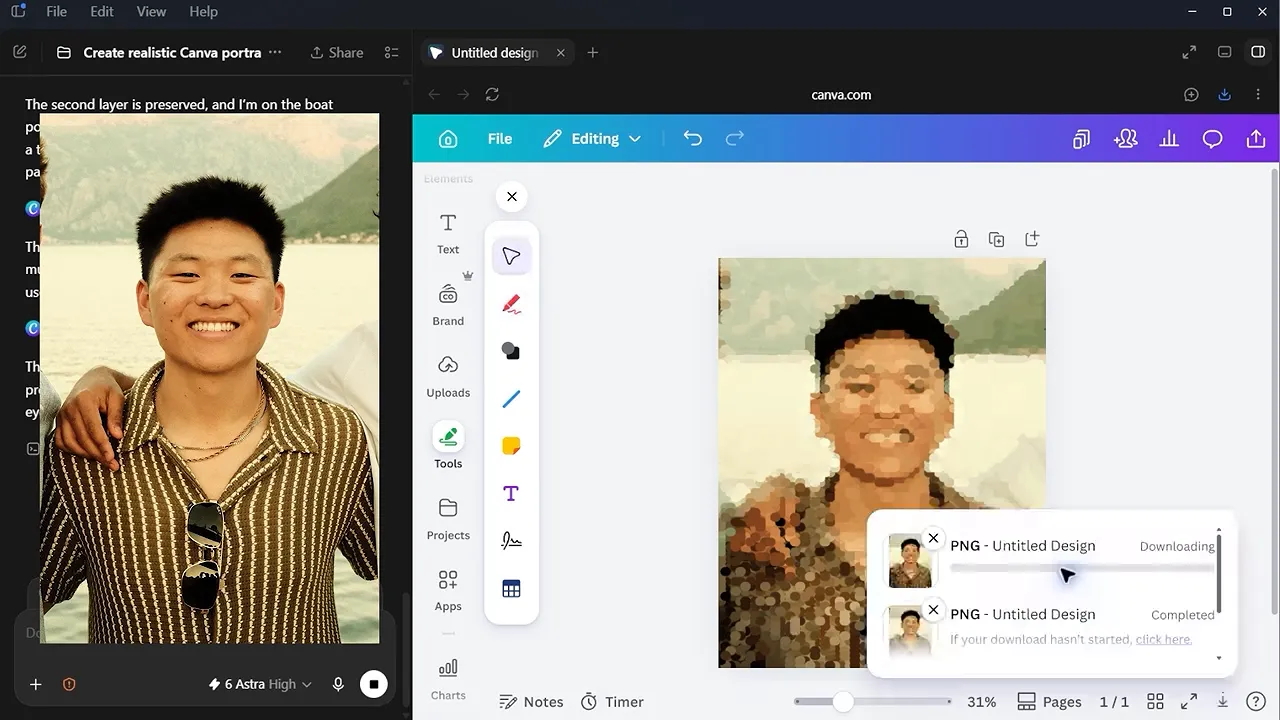
It is a silly example, but it demonstrates something useful: the agent can interpret visual information and operate an interface, not just exchange text with an API.
15. Sites: Move Beyond Localhost
Remember the local website nobody else could open? Sites is the publishing piece in the Codex setup I demonstrated.
You can ask Codex to turn something it built into a hosted site, or use /site. That gives you a way to share the result instead of leaving it running only on your computer.
Access settings matter. One of my example sites was accessible to anyone with its URL. Another was restricted to my account. A hosted URL does not automatically mean the content should be public.
The demonstrated Sites interface also included:
- Site analytics.
- Custom domain connection.
- Database support for application data.
That brings building and hosting much closer together. For some projects, it can cover work you would otherwise handle through a separate hosting platform. The important distinction is that building a local prototype and publishing an accessible site are two different steps.
16. Subagents: Delegate Work in Parallel
Subagents let the main Codex session delegate pieces of a task to other agents.
Suppose I want to understand what people are discussing in AI. I could ask my main model to research everything itself. Or I could have it send separate agents to investigate X, YouTube, and my own audience comments.
That is what I did. I asked the main session to delegate the research and specified a less expensive model for the workers.
This gives you two useful controls:
- Parallelism: independent research tasks can run at the same time.
- Model allocation: the main model can coordinate while other models handle narrower assignments.
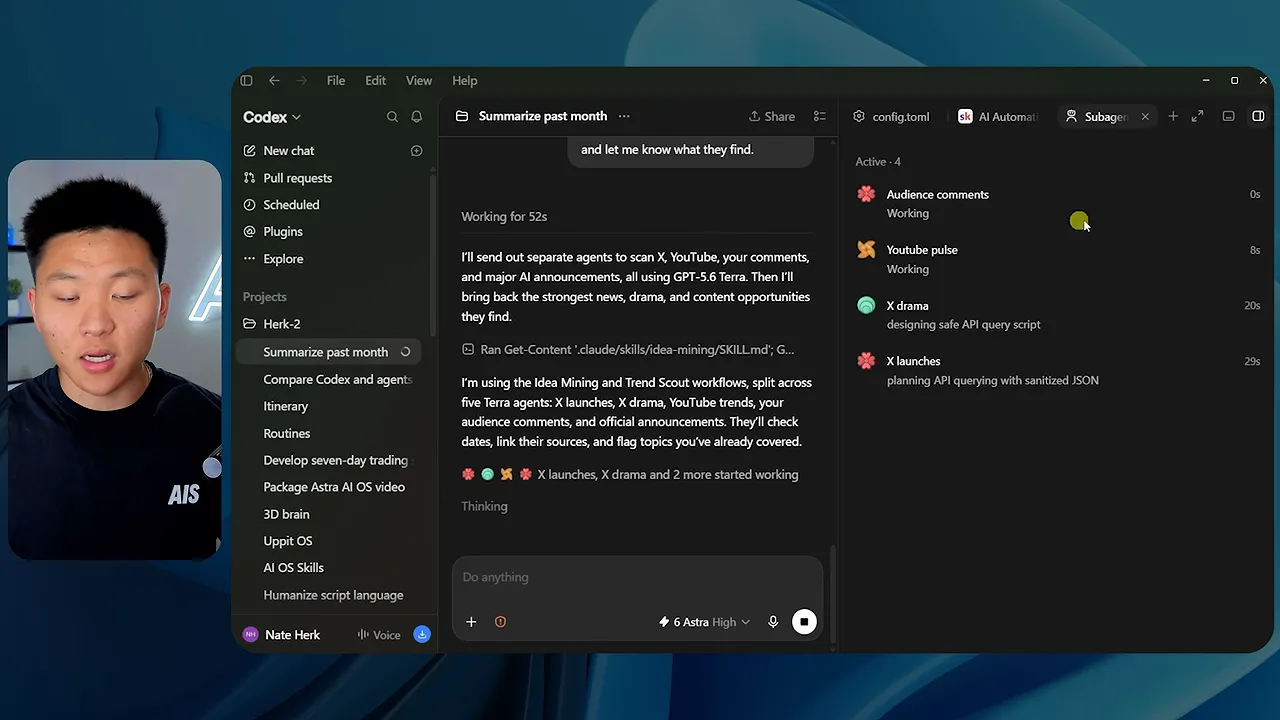
In my example, agents took on assignments such as YouTube activity, X discussions, and audience comments. I could open their sessions and inspect their tool activity, but I did not have to manage every step.
When they finished, the main session collected the findings and synthesized the result. This is especially useful for independent research tracks, different perspectives, and testing multiple things in parallel.
17. Scheduled Tasks: Run the Workflow Automatically
A scheduled task is essentially a prompt delivered to a Codex session at a specified time.
That simple idea is powerful because the session can use its project context, available files, skills, tools, and agent loop. You are scheduling work, not just scheduling a notification.
In the Scheduled area, you can configure:
- Local or cloud execution.
- The project to work in.
- A new conversation or an existing thread.
- Hourly, daily, weekly, or more customized timing.
- The instructions the agent should execute.
You can fill this out manually, or describe the routine and ask Codex to create it.
For a more extreme example, I set up seven or eight routines inside a separate trading challenge project. They checked markets, coordinated work, and placed trades involving $10,000 of my real money.
That is an example of the autonomy involved, not a reason to assume trading with AI is safe or profitable. Start with lower-risk work and understand the permissions before automating consequential actions.
For local routines, remember the environment requirement: the machine doing the work needs to remain available.
18. Voice Mode: Coordinate the Whole System by Talking
Voice mode ties all of this together. You can use a conversation to manage threads, run skills, delegate agents, create scheduled tasks, and request sites.
In my setup, I start it from the voice chat control in the bottom-left corner.
For a practical example, I asked Codex to start a new thread in my Herk 2 project and create a YouTube thumbnail about these 18 concepts. The brief was me at a desk with a laptop, pointing toward a group of 18 small AI agents.
Then I added a second instruction: once the thumbnail was finished, send it to the existing thread researching YouTube, X, and my channel.
That one spoken request brought several concepts together:
- Codex identified the right project and reference material.
- It started a separate thread in a worktree.
- It created a goal and began working through the task.
- It produced the thumbnail.
- It sent the finished result to the research thread.
The voice conversation could continue while I moved around the app or switched to other work. With the remote setup, I could also use voice from my phone while the desktop handled the task.
That is the real value here. Voice is not just a faster way to type a prompt. It becomes a way to coordinate multiple pieces of work without opening and managing each conversation individually.
Build an Operating System, Not a Collection of Chats
You do not need to use all 18 concepts on day one. Start with a project, give it clear instructions in AGENTS.md, and pay attention to how Codex uses its tools.
Then turn one recurring task into a skill. Connect the apps that task needs. Once the workflow is reliable, consider delegation, scheduling, or voice control.
The biggest improvement comes from connecting the pieces. Projects supply context. Instructions establish the rules. Skills make good work repeatable. Tools let the agent act. Subagents and scheduled tasks extend what it can get done.
That is when Codex stops feeling like another place to ask questions and starts becoming a system that helps you do your work.


