You can build useful software with AI without spending years learning to code first. Personal tools, internal automations, client solutions, even subscription products are now within reach of people who would never have considered themselves developers.
But there is a pretty big difference between getting an app to run and building something other people can safely rely on.
That is the part I wanted to unpack with Dave Ebbelaar, who has been coding in Python since 2013 and whose team has delivered more than 50 AI solutions. His approach is encouraging: use the agents, build things, and learn by doing. Just understand when the stakes change.
The opportunity is not to avoid software engineering entirely. It is to let AI handle much of the implementation while you learn how to direct, evaluate, and take responsibility for the result.
Key Takeaways
- Start with personal tools and increase responsibility as your software reaches teams, clients, and public users.
- Use coding agents to implement ideas, then refine them through concrete feedback and repeatable evaluations.
- Calibrate subjective AI judges against human-reviewed examples instead of assuming their judgments are reliable.
- Understand architecture, data access, deployment, and secret handling before asking others to trust your software.
Table of Contents
- AI Has Changed What One Builder Can Deliver
- Start With the Four-Rung Software Ladder
- Build With Agents, Then Use the Product to Refine Your Intent
- How to Tell Whether Your AI-Built App Actually Works
- How to Evaluate Subjective Quality With an LLM Judge
- Before Scaling, Understand Two Levels of Architecture
- Security Is the Part You Cannot Fix Retroactively
- The Opportunity Is in Implementing, Not Just Accessing the Tools
- Sponsor Note: Reviewing Code When Agents Produce More of It
AI Has Changed What One Builder Can Deliver
Learning to code used to involve a lot of effort for a relatively small payoff at the beginning. You could spend hours searching Stack Overflow and debugging a tiny program before you had anything useful.
Now you can describe an idea and get a working starting point from a single prompt. That does not make every first attempt production-ready, but it changes the size of the projects you can realistically attempt.
Dave initially put his improvement at around 100 times faster than when he was starting out, then immediately qualified it. Comparing an experienced engineer with AI against a complete beginner is not a fair comparison.
His more useful benchmark was 2022, when he was already writing Python professionally as a freelance data scientist and analyst. Against that baseline, he estimates a solid 10 times improvement in useful, shippable output. That is his personal experience, not a universal productivity guarantee.
The bigger shift is what he can build at all. Coming from backend systems and data science, he had barely written JavaScript before coding agents. Now frontend applications, custom websites, and dashboards are part of what he can deliver.
So the benefit is not just doing the same work faster. It is expanding the range of problems you can solve.
Why being a generalist is more valuable now
There is still a place for deep specialization, especially on highly specialized enterprise teams. But for independent builders and smaller product teams, being able to work across the stack has become incredibly useful.
If you can only handle the backend, your agent might finish its work and then sit waiting for a frontend integration. If you cannot work with the database, the same thing happens there. The bottleneck moves from writing code to coordinating handoffs.
Dave’s team still has separate responsibilities, but people get ownership of a complete aspect of the product. They can take it from idea to implementation without needing another person to write a missing piece. Review is still part of the process.
The goal is not to become an expert in every programming language. It is to understand enough engineering to guide work across the whole application.
Start With the Four-Rung Software Ladder
Before asking which AI coding tool to use, ask a more important question: Who is going to use this, and what happens if it goes wrong?
Dave breaks software projects into four levels. Each level adds complexity, responsibility, and risk.
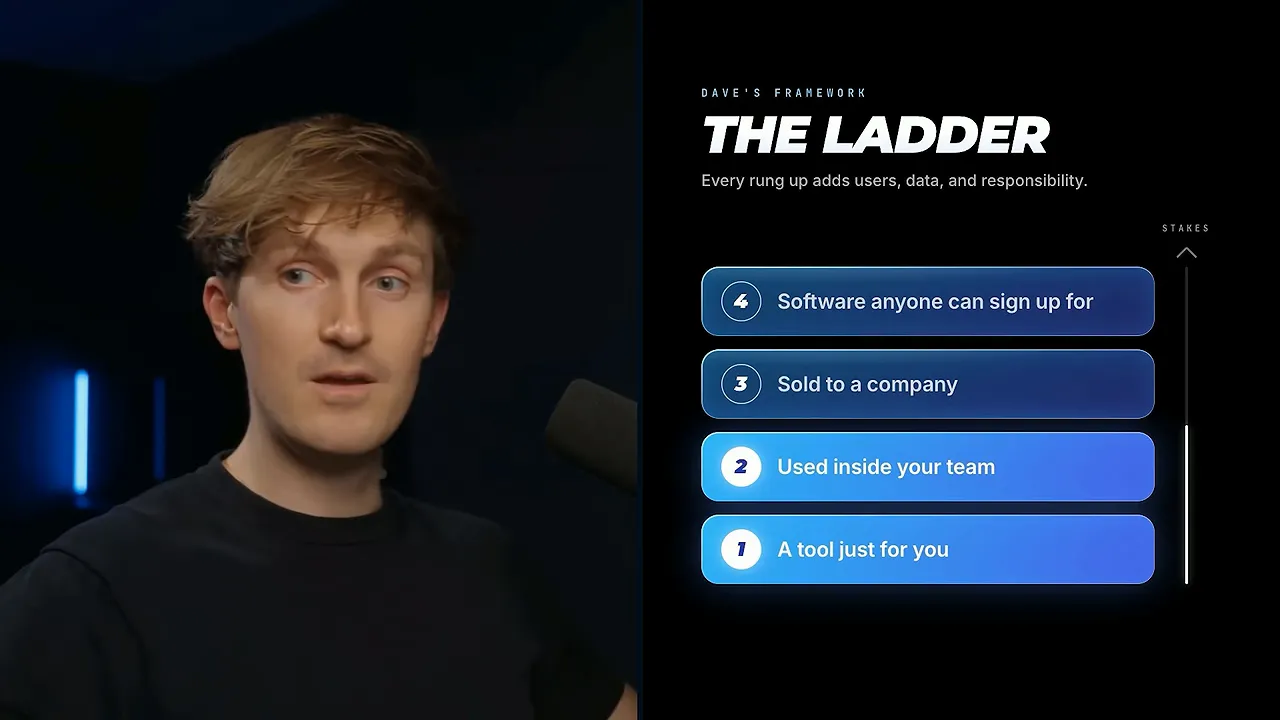
Rung 1: A tool just for you
Maybe you want to replace a subscription, combine several tools, or create something that does not exist yet.
This is the best starting point. You know the problem, you can judge whether the result is useful, and the consequences are usually more contained than they would be with customers.
For a low-stakes personal project, you do not need a huge planning process. Open Claude Code or Codex and start building. Still pay attention to any sensitive data or credentials the tool touches.
Rung 2: A tool for your team
Now other people are using it. It may still be internal software, but you need to think about who gets access, what data flows through it, and how colleagues will depend on it.
An internal label does not make an application automatically safe. It simply describes a smaller, more controlled audience than a public product.
Rung 3: A solution you sell to a client
This could be a productized AI automation offer or a custom implementation for a business. Often, it is a combination: you package a repeatable solution, then customize it for each client.
That service component matters. Business automations are rarely identical, even when they solve similar problems.
At this level, contracts, terms of service, data protection obligations, and delivery expectations become part of the work. You are no longer just experimenting. Another organization may rely on what you build.
Rung 4: A self-service software product
This is a product someone can discover, sign up for, subscribe to, and use without you personally implementing it for them. Glaido, the dictation application Dave’s team is building, fits this category.
More users and less direct supervision mean more responsibility around privacy, security, infrastructure, and reliability.
You can move up this ladder over time. Starting with a personal tool does not lock you into that category forever. You can improve the architecture, strengthen security, and expand its audience later.
The mistake is skipping the learning between levels. Going straight from no technical experience to selling custom software that businesses depend on can leave you unaware of the data flows and risks you have created.
Build With Agents, Then Use the Product to Refine Your Intent
One of the most interesting parts of this conversation was how similar the tools have become for beginners and experienced engineers.
Dave says he no longer writes code manually. His implementation work goes through coding agents such as Claude Code and Codex. Someone starting today can use those same tools.
The difference is in the instructions, the review, and the judgment applied to the output.
You do not always need a giant specification first
Spec-driven development means describing how a product should work before asking an agent to implement it. You might use AI to create requirements documents, review those documents, and only then approve code generation.
That process can still be useful, especially when it helps clarify your thinking. But Dave has moved away from making large specifications a prerequisite for every build.
As models and their surrounding tools improve, he finds it increasingly effective to explain the goal, get a working version, and react to something concrete.
That is a practical form of intent-driven development: you explain the outcome you want, and the agent handles more of the implementation details.
There is a good reason this works. It is hard to give great feedback on a product that exists only in your head. Once you can use it, the feedback becomes much more specific:
- This interaction feels slow.
- This screen does not look right.
- The output is incorrect in this case.
- This feature is useful, but the workflow needs to change.
You can also ask the AI to interview you before it starts. Have it clarify what you want, what you do not want, and what the finished experience should feel like. That helps turn a vague idea into a clearer direction without creating documentation for its own sake.
Use a short build-and-feedback cycle
- Describe the useful outcome. Explain who the tool is for and what it should help them accomplish.
- Let the agent build an initial version. Use a capable coding agent rather than trying to solve every implementation detail yourself.
- Use it. Check the visual experience, the logic, and the outputs.
- Give concrete feedback. Explain what happened and what should happen instead.
- Repeat. Improve the product through successive iterations.
For an existing product, Dave often creates a separate branch in the real codebase and experiments there. He can see how the feature behaves inside the actual application without immediately shipping it to users.
That separation matters. Building against the product’s codebase is not the same as pushing unreviewed changes into production.
Better agents can absorb more of the planning process
It is not only the underlying model that is improving. The agent’s harness, meaning the tools and workflow around the model, is improving too.
Explicit plan mode used to help an agent pause, reason through the task, and then execute. Dave’s observation is that stronger model-and-harness combinations increasingly perform some of that reasoning as part of their normal workflow.
This does not mean planning has become pointless. It means you should not assume that every small experiment needs a long, separate planning phase before anything can be built.
How to Tell Whether Your AI-Built App Actually Works
A convincing interface is not proof that the underlying system works. Neither is an agent confidently telling you it finished the job.
The starting question is simple: What does good look like?
For Glaido, Dave describes a good experience as pressing a button, speaking, having the speech processed quickly, and getting ready-to-use text inserted into the application. The target he gives is processing in under 500 milliseconds, while correcting errors and preserving most of the original speech.
That is much more useful than saying, “Make the dictation better.” It identifies the behavior the team wants to improve.
Turn expectations into examples
Once you define success, collect examples of it. For a given input, what output do you expect?
Dave’s team uses data from its own internal accounts for these experiments rather than customer data, in keeping with its privacy-focused design. As the team uses the product, that internal dataset grows.
The same principle applies to chatbots, business automations, and other AI applications. Build a set of cases that lets you compare what the system produces against what you want it to produce.
If you do not have enough examples, you can ask an AI model to generate realistic candidate data. Those examples still need to reflect your actual use case; generating data is not the same as establishing that it is representative.
Give the agent a goal and a way to check progress
When an agent has both a target and a verification method, it can do more than make a single attempt.
You can ask it to run experiments, research alternatives, use subagents, measure results, and keep iterating. Latency is a particularly clear example: run a test, make a change, run it again, and see whether the system got faster.
A useful evaluation loop looks like this:
- Define the desired behavior or metric.
- Provide representative inputs and expected results.
- Measure the current performance.
- Ask the agent to make improvements and rerun the checks.
- Review whether the changes actually improved the product.
This is where awareness becomes valuable. You do not need to manually implement every evaluation, but you do need to know to ask for one.
Stronger models can make testing, debugging, and quality assurance easier. They do not remove the need to define what is being tested.
How to Evaluate Subjective Quality With an LLM Judge
Some goals are easy to measure. A response took less time, a test passed, or an output matched the expected result.
Other goals involve taste. Does a customer support reply feel helpful? Does an edit feel professional? Is an animation engaging?
There may be thousands of acceptable responses to the same customer question. Exact wording is not the real goal. Helping the customer is.
Start with human judgment
The most direct way to evaluate subjective work is to have a person review it. But having a human inspect every output can defeat the purpose of automation.
The solution is to do some of that manual work upfront and turn it into reusable evaluation data.
For example, collect 100 customer support exchanges. Have a human label the AI’s replies as good or bad and explain why. That work captures standards that might otherwise stay implicit.
Align an independent LLM judge with those labels
An LLM as a judge is another model call that reviews the first model’s output. It can assess whether the reply is good and explain its reasoning.
But using a second model does not automatically solve the trust problem. You need to find out whether its judgment agrees with the human standard.
- Create the human-reviewed dataset. Include decisions and reasons, not just unlabeled examples.
- Run the judge on the same examples. Compare its decisions with the human labels.
- Measure agreement. Establish a baseline for how often they align.
- Refine the judge’s instructions. Use disagreements to clarify what it should value or reject.
- Repeat and periodically recheck. Monitor whether the judge remains aligned over time.
Now the subjective problem has a measurable component: how often does the judge agree with the person whose standards you want to capture?
Improvement is not guaranteed to reach a particular percentage. The point is that you have a process for testing the judge rather than assuming it has good taste.
Changing models can change the result, too. A new model may interpret the same instructions differently, so it needs to be checked against the human-reviewed examples again.
Visual work adds another challenge
The same general approach can apply to editing or animation, but the model has to be able to inspect the relevant visual details.
Judging whether a title animation feels right is harder than detecting an obvious error in text. As multimodal capabilities improve, this process becomes more practical, but the quality of the model’s perception still matters.
I think of it like a sports scout. Some qualities show up in measurements. Others depend on experience and judgment. The challenge is capturing enough of that judgment that an automated evaluator becomes useful.
Before Scaling, Understand Two Levels of Architecture
You do not need to become a senior engineer before starting. But if you want to build software other people depend on, architecture is a high-value area to learn.
Dave separates it into two levels: the overall system and the structure inside the codebase.
System architecture: How the parts communicate
Most applications combine several components:
- Frontend: The interface people interact with.
- Backend: The application logic and services behind that interface.
- Database: The place where persistent information lives.
- Other services: Additional systems the application depends on.
You want to understand each component’s role and how information moves between them.
The right setup depends on whether you are building a web, desktop, or mobile application. You might have a Python backend and a JavaScript frontend. Or you might use TypeScript across both parts of the application.
This combination of languages, frameworks, and services is your stack.
As the project gets more serious, ask your agent questions such as:
- What stack best fits this application, and why?
- Do I need a separate frontend and backend?
- What database fits the data and workflows?
- What is the simplest setup that supports the intended product?
- What tradeoffs would become expensive to change later?
A real landmine: Choosing the familiar stack
Dave’s team had to change Glaido’s stack after starting with a setup that was not the best fit for the product. Familiarity and team structure influenced the original decision more than they should have.
Switching languages or stacks is easier with coding agents than it used to be, but it can still create substantial rework.
The lesson is not to obsess over the perfect stack before building a personal prototype. It is to research the fit before committing to a larger product.
AI also changes the tradeoff here. You no longer have to choose a technology only because it is the one you already know. You can consider a better-fitting option and use agents to help you work with it.
Codebase architecture: Keeping experiments from becoming spaghetti
The second level is how the project is organized internally: files, folders, functions, classes, and modules.
Fast experimentation can leave a messy trail. You try a feature, leave it unfinished, build something else, and eventually forget what depends on what.
Then you remove an apparently unused feature and discover that it contained a small piece of logic another feature still needed. Something that worked for months suddenly breaks.
That is not just annoying for humans. A tangled codebase also makes it harder for agents to locate the right logic and modify it safely.
Dave recommends learning from Matt Pocock’s engineering skills, including his work on improving codebase architecture. Concepts such as deep modules, locality, and clear boundaries help make code easier to navigate and change.
You do not need to master every concept immediately. Reading a well-designed skill, applying it with your agent, and reviewing the results can be part of how you learn.
Security Is the Part You Cannot Fix Retroactively
Dave is enthusiastic about vibe coding. He has used it himself to build interfaces without inspecting every line of code.
But his enthusiasm comes with a boundary: the more your application handles other people’s information, the less acceptable it is to rely on appearance and happy-path testing alone.
A slow application can often be optimized. Broken functionality can be repaired. A leaked email address or private record cannot be made private again by shipping the next version.
Security is a large discipline, and a handful of settings cannot make an application impossible to compromise. Still, understanding the basics is a much better starting point than leaving everything to chance.
1. Secure your database and its access rules
Dave’s default recommendation for a nontechnical builder is managed Supabase, unless there is a strong reason to choose something else. His point is to avoid unnecessary database complexity while you are learning.
Using a managed service does not mean configuration no longer matters. Start by understanding:
- Row-level security: Policies that control which records a user can access.
- Strong passwords: For database access and the account managing the service.
- Two-factor authentication: An additional safeguard for the management account.
- Credential handling: Keeping sensitive credentials out of committed application code.
The Supabase row-level security guide is a useful place to understand what those policies do and how to apply them.
Do not treat enabling a setting as proof that access is correct. You need to understand the policies and verify that users cannot retrieve data they should not see.
2. Understand where your backend runs
While you are developing, the application may run locally on your laptop. Deployment puts it somewhere other people can reach.
Options include services such as Railway and Render, a virtual private server, or cloud infrastructure from AWS, Azure, or Google Cloud.
The important question is not just which service makes deployment easiest. It is what becomes reachable after deployment, and how access is controlled.
Infrastructure covers where the services live, how they communicate, and what protections surround them.
3. Restrict unnecessary network access
Firewalls and network rules can limit which systems are allowed to connect to a backend or database.
For service-to-service communication, that might include allowing traffic only from known infrastructure. But the exact design depends on the application. Browser code and desktop clients do not all originate from one trusted deployment IP address.
So do not blindly apply an IP allowlist intended for a server to every user-facing application. Ask your agent to explain the actual request path and which protections belong at each boundary.
The useful principle is to expose only what needs to be public and protect the rest appropriately.
4. Keep secrets out of exposed code
API keys, privileged credentials, and other secrets should not be hardcoded where someone can retrieve them from a repository or inspect them in a browser.
Environment variables are part of this workflow, but the execution environment matters. A value delivered to browser code is not a protected server-side secret simply because it started in an environment variable.
Have your agent review where each credential is stored, where it is used, and whether it could be exposed to users.
These are topics to investigate for your specific application, not a universal security certification. The point is to develop enough understanding to ask useful questions and assess the answers.
The Opportunity Is in Implementing, Not Just Accessing the Tools
It is easy to think that if everyone has access to the same AI tools, the opportunity disappears.
But access is not implementation. A business being able to use an agent does not mean it will identify the right problem, build a solution, evaluate it, and integrate it into daily work.
That is where builders still create value.
You can build a tool for yourself, turn what you learn into an internal solution, offer implementation services, or eventually create a product. You can also learn from technical guides and repositories with an agent helping you understand and apply the material.
Dave now pairs his technical tutorials with detailed handbooks and documentation. That creates another path for beginners: use an existing, well-explained build as a learning resource rather than asking an agent to invent everything from scratch.
You do not necessarily have to quit your job to explore this. A side project can be a way to build the skills and judgment before taking on bigger commitments. Agents can work asynchronously, but you still need to review what they produce before delivering it.
The exciting part is how much closer an idea is to a working tool. The responsibility is making sure the tool deserves the trust you ask people to place in it.
Start with something useful. Define what good looks like. Test it. Learn how the parts connect. Increase the stakes only as your understanding and safeguards improve.
If you want help turning those skills into a first paid project, my free First Client SOP covers a simple service pitch, demonstrating delivery before you have case studies, and practical steps toward landing an AI automation client.
|
Sponsor Note: Reviewing Code When Agents Produce More of It
CodeRabbit sponsored part of the conversation. Its Chainstack review interface addresses a problem that becomes very real with coding agents: a single change can span routes, schemas, tests, and configuration faster than you can read it.
Instead of leaving you to reconstruct the logic from an alphabetical file list, it groups related work and orders it by dependencies. It also provides a pull request overview, merge blockers, a change timeline, and a semantic diff that helps distinguish moved code from actual changes.
You can ask questions about a pull request within the interface. At the time of the promotion, CodeRabbit offered a free 14-day trial with no credit card required.


