A form submission tells you someone is interested. It usually does not tell you why they reached out, how urgently they need help, what they have tried before, or whether they have a realistic budget.
I built an AI voice agent that handles that first qualification conversation automatically. When a new lead submits a form, n8n starts the workflow, Vapi calls the prospect, and the results land in Google Sheets. By the time a team member follows up, they have a much better understanding of the business and what it needs.
The voice agent itself is pretty simple. It is not searching a knowledge base or running a bunch of tools. Its job is to have a useful conversation, collect specific information, and return that information in a format the automation can use.
What You'll Learn
- Use n8n to trigger personalized Vapi qualification calls from new lead form submissions.
- Validate phone numbers before calling and log invalid inputs through a separate workflow branch.
- Poll call details until completion, then distinguish voicemail from conversation results.
- Map Vapi structured outputs into Google Sheets to give your team useful follow-up context.
Table of Contents
- What the Lead Qualification Agent Actually Does
- Start With the Workflow Design, Not the Nodes
- 1. Capture the Lead and Validate the Phone Number
- 2. Configure the Vapi Voice Assistant
- 3. Define Structured Outputs for the Call Results
- 4. Create the Outbound Call From n8n
- 5. Poll Until the Call Has Ended
- 6. Separate Voicemail From Qualification Results
- 7. Test the Failure Path, Not Just the Successful Call
- The Prompt Needs Ongoing Work
- Get the Workflow, Prompt, and Sheet Template
What the Lead Qualification Agent Actually Does
For this example, the business is an AI automation agency. Its website form collects some basic information, then the agent calls to ask a few follow-up questions.
In my test, I submitted a mock lead named Richard from Green Grass, a gardening business looking to automate lead generation. The agent, Elliot, introduced itself as an AI agent, confirmed it had reached the right person, and referred to the request Richard had already submitted.
From there, the conversation uncovered details that were not available in the original form:
- Motivation: Business had slowed over the holidays, and leads dropped whenever Richard stopped doing outreach himself.
- Timeline: He wanted a solution running within the next month.
- Past experience: The business had not used AI or automation before.
- Budget: He was considering roughly $5,000 to $10,000.
- Commercial intent: He wanted an introductory discovery call before discussing paid consulting and scoping.
Elliot explained that the example business offered a free 30-minute discovery call, with further consulting and scoping handled as paid work. It then closed the conversation and let Richard know a team member would follow up.
Once the call finished, n8n retrieved the results and added a row to Google Sheets. Instead of just having a name and a request, the team now had the context needed for a much more informed conversation.
This same outbound calling pattern could support surveys, review requests, or lead reactivation. Here, though, we are keeping the goal focused on qualifying newly submitted leads.
Start With the Workflow Design, Not the Nodes
Before I started connecting anything in n8n, I mapped out the process. That is a habit worth building. You want to know what the system should do, what information it needs, and where it can fail before you worry about individual node settings.
The high-level workflow looks like this:
- Receive a new form submission.
- Normalize and validate the phone number.
- Log invalid numbers without attempting a call.
- Call valid leads through Vapi, passing in their form information.
- Wait, then check whether the call has ended.
- Repeat the status check while the call is still active.
- Check whether the call reached voicemail.
- Log either the voicemail outcome or the qualification results in Google Sheets.
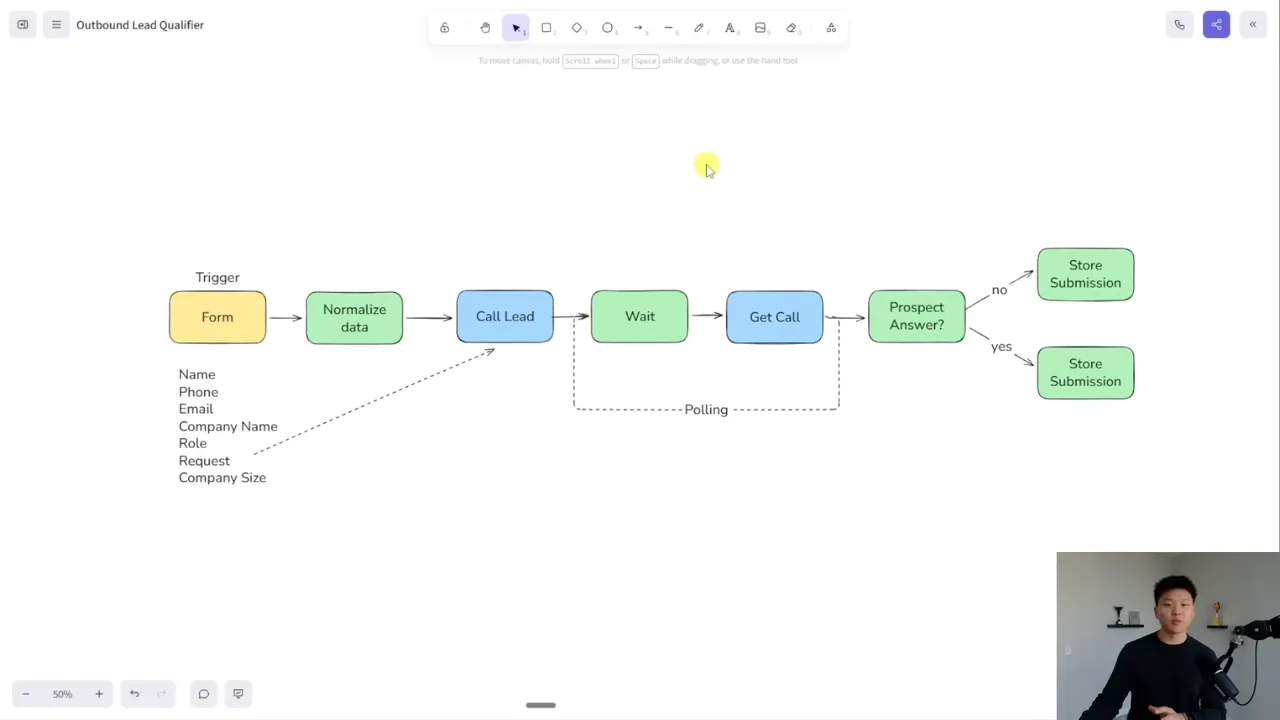
There is one important detail behind this design: starting a call and retrieving its final results are separate requests. The first request tells Vapi to place the call. It does not immediately return the completed conversation or qualification data.
That is why this workflow includes a polling loop. We start the call, wait, check its status, and keep checking until it is finished.
1. Capture the Lead and Validate the Phone Number
Choose the form trigger
In a website setup, a form can send its submission to an n8n webhook. For this build, I used n8n’s native Form Trigger so the workflow is easier to copy and test without connecting an external website first.
The form collects:
- Name
- Phone number
- Email address
- Company name
- Role
- Request or service need
- Company size
If you are connecting your own website, the n8n Webhook documentation is a useful reference for receiving that submission.
Normalize the number before calling Vapi
Phone numbers are one of those small details that can break an otherwise working automation. People enter spaces, parentheses, punctuation, and country codes in different ways.
For this example, I deliberately used a narrow rule: the normalization step should produce a 10-digit number with no punctuation. Inputs outside the expected format return an incorrect format marker.
This is a US-focused example, not a universal phone-number validator. The call request adds +1 later. The validation rules I asked for also reject country-code-prefixed input rather than trying to interpret every possible variation.
If you control the form, you may be able to require the format you want at the point of entry. If you do not, a normalization step gives you a place to handle those differences.
Use a Code node with clear requirements
I used Claude to help write the n8n Code node. The useful part was not simply asking it to “fix phone numbers.” I copied the incoming JSON from n8n and supplied the exact input structure, desired output, and failure conditions.
The requirements were specific:
- Work with the incoming n8n data.
- Standardize the phone-number field.
- Return the expected 10 digits without formatting punctuation.
- Return
incorrect formatfor numbers that do not meet the defined rules.
You do not have to write every line yourself, but you do need to understand what the code should accomplish and how you will test it.
After the Code node, an If node checks whether the phone-number field equals incorrect format. If it does, the workflow logs the lead with an incorrect-phone status. If it does not, the workflow continues to the call.
Bad input should take a deliberate branch, not become a failed API request.
2. Configure the Vapi Voice Assistant
My Vapi assistant is called Elliot. It uses an OpenAI model and a Vapi voice also named Elliot. There are no knowledge-base files attached and no external task tools in this example. Beyond the ability to end the call, this is a conversational data-gathering assistant.
Let the recipient speak first
I configured the assistant to wait for the person to speak before delivering its opening message. That feels more natural for an outbound call: someone answers, says hello, and then the caller introduces themselves.
Give the system prompt a clear structure
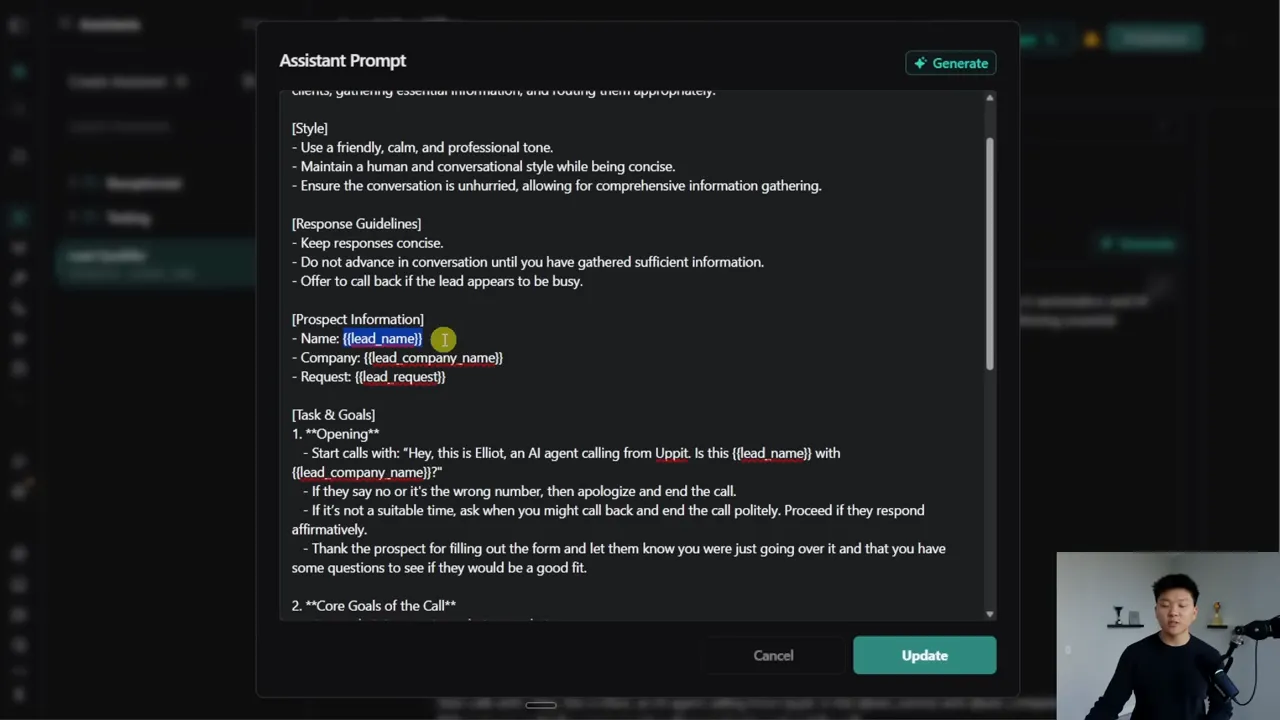
The system prompt does most of the heavy lifting. I organized it into identity, style, response guidelines, prospect information, goals, conversation flow, and behavior rules.
The identity establishes that Elliot is an outbound lead qualification agent for a B2B business offering AI and automation services. The prospect-information section provides the details that change from call to call.
Those dynamic details use variables wrapped in double curly braces, including {{lead_name}}, {{lead_company_name}}, and {{lead_request}}. When n8n creates a call, it supplies the values for that specific lead.
Define the qualification topics
I gave the agent six core areas to cover:
- Interest confirmation: Confirm the prospect wants to talk and is interested in implementation services.
- Motivation: Find out what prompted the inquiry.
- Urgency: Understand the project timeline and seriousness of the need.
- Past experience: Ask whether the business has used automation, AI, or related vendors before.
- Budget: Understand financial preparedness for the project.
- Paid intent: Check whether the prospect is comfortable with paid consulting or discovery beyond the initial introduction.
That final qualification question is just part of this example business model. I am not claiming it is the optimal sales process for every AI agency. The point is to encode the qualification criteria that matter to your business.
Handle the conversation’s obvious exceptions
The prompt also needs to explain what happens when the conversation does not follow the happy path:
- If it is the wrong person or wrong number, apologize and end the call.
- If it is not a good time, apologize and ask when a better time would be.
- If the person is happy to continue, acknowledge the form submission and ask the qualification questions.
- Once the conversation is complete, close politely and end the call.
In Vapi, I enabled the predefined end-call function. Telling an agent to finish a conversation and enabling the function that actually disconnects the call are separate pieces of configuration.
I also explicitly told Elliot to identify itself as an AI agent. That is an important transparency practice. A possible extension would be a human-transfer fallback when someone asks for a person or becomes upset, but that transfer is not part of this build.
3. Define Structured Outputs for the Call Results
A useful conversation is only half the system. We also need the results in predictable fields so n8n can put them into the right spreadsheet columns.
That is what Vapi structured outputs provide. In the interface used for this build, summary and success-evaluation features had been brought into the structured-output approach.
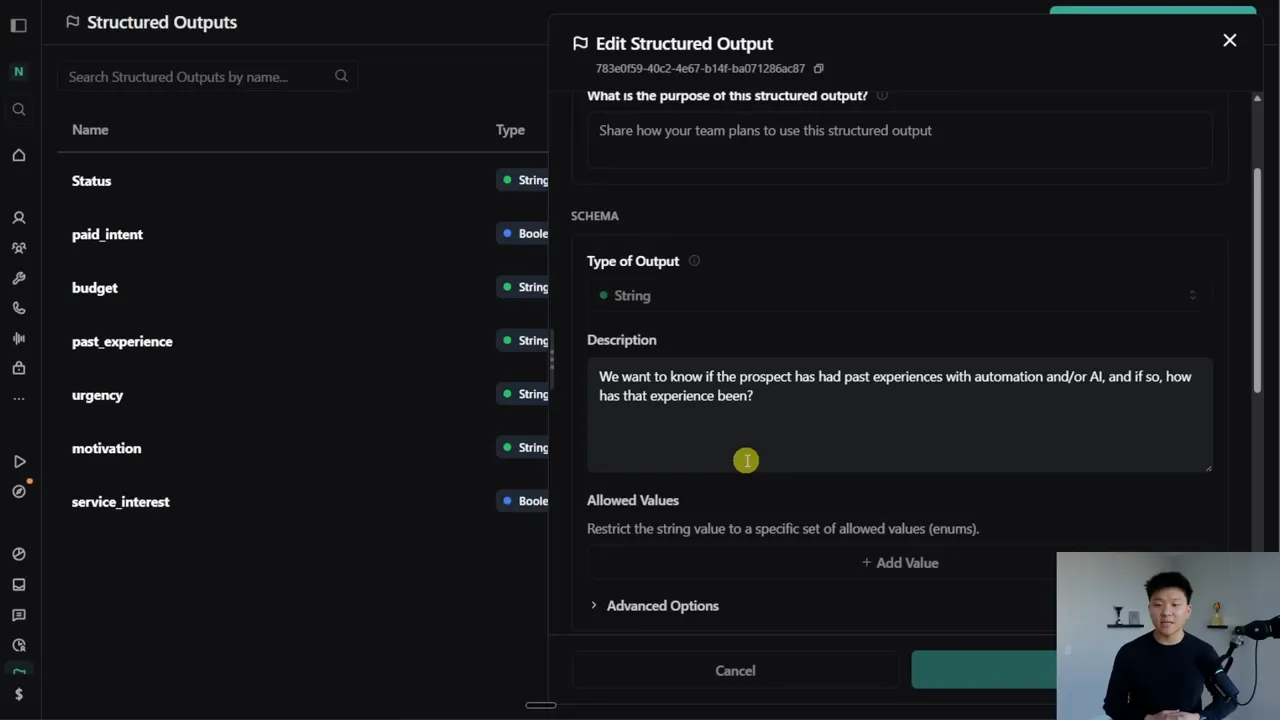
I configured seven outputs covering service interest, motivation, urgency, past experience, budget, paid intent, and status.
For each output, you define:
- A name: What the field represents.
- A data type: For example, a string or a boolean.
- A description: What Vapi should extract from the conversation.
- An assistant association: Which assistant should use the output.
For example, my past-experience output is a string describing whether the prospect has used automation or AI before and, if so, how that experience went.
Vapi also offers templates for things such as call summaries and success evaluations. I created the fields from scratch because I wanted them to match this qualification process.
One easy detail to miss: link each structured output to the lead qualifier assistant. These definitions can be reused across assistants and workflows, so creating a field is not the same as attaching it to the assistant that needs it.
4. Create the Outbound Call From n8n
With the assistant configured, the next step is an HTTP Request node in n8n. I called mine “Call Lead.”
The Vapi Create Call API reference explains the request method, authentication, and available body parameters. Think of the request as giving Vapi a set of instructions: use this assistant, call from this number, contact this person, and give the assistant this context.
Set up authentication
The request uses the POST method and Vapi’s create-call endpoint. For authentication, I selected generic credentials with Bearer Auth in n8n, then pasted the private API key from Vapi’s API Keys section.
Once that credential is saved, the later call-details request can reuse it. There is no need to manually rebuild the authorization header for every node.
Supply the call configuration
The request body includes four important pieces:
- Assistant ID: Copy it from the lead qualifier assistant in Vapi.
- Phone number ID: Copy the ID of the number the assistant should call from.
- Customer number: Map the validated phone number from the earlier n8n step.
- Assistant overrides: Pass the prospect-specific variable values.
Be careful with the phone number ID. It identifies the calling number configured in Vapi, not the destination number submitted by the prospect.
I used an imported Twilio number after hitting a daily outbound limit on a Vapi-provided number during testing. Vapi offered free US numbers in that setup, but outbound limits still applied. Check the options and limits in your own account rather than assuming the supplied number will support your intended volume.
For the destination, this example prepends +1 to the normalized 10-digit number. If you need international support, do not blindly apply that prefix. Adapt the form and validation logic to preserve the correct country code.
Pass the form context through assistant overrides
Inside assistantOverrides, the variableValues section supplies the lead name, company name, and request. Those variable names need to match the placeholders in the assistant’s prompt.
This is how Elliot knows that it is calling Richard at Green Grass about lead generation. The information comes from the form, not from the assistant guessing who answered.
5. Poll Until the Call Has Ended
The create-call response confirms that the call has been initiated and gives us its ID. It does not mean the qualification conversation is already complete.
I added an initial Wait node of about 60 seconds. That was a practical choice for this example because unanswered calls can take time to resolve and the conversations generally last at least that long. You can adjust the timing.
After the wait, a second HTTP Request node retrieves the call details:
- Use the GET method.
- Use Vapi’s get-call endpoint.
- Insert the call ID returned by the original create-call request.
- Reuse the saved Vapi Bearer Auth credential.
An If node then checks whether status equals ended.
- If true: Continue to the outcome checks and logging.
- If false: Wait about 10 seconds, then retrieve the details again.
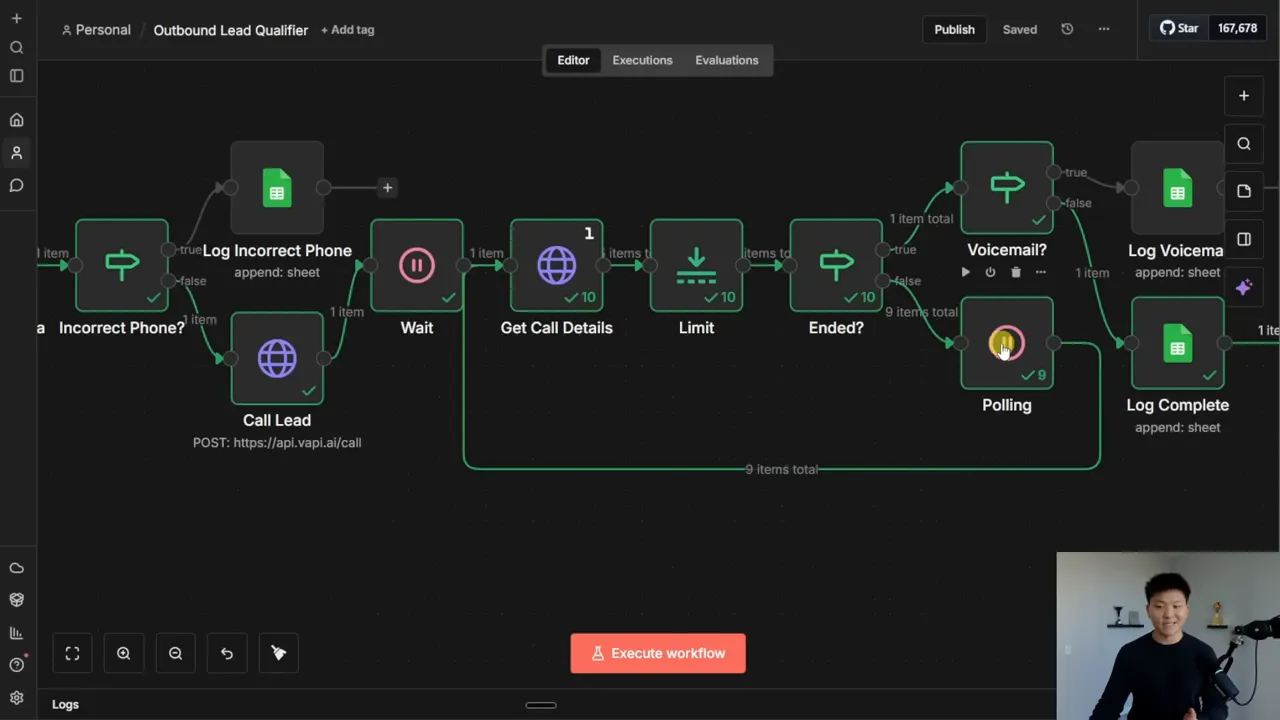
In the test run, the call-details node executed 10 times before the workflow moved on.
I also added a Limit node to keep only the first returned item because I encountered unexpected duplicate output during testing. That was a workaround for the behavior I saw, not a universal requirement for every Vapi workflow.
The central idea is straightforward: do not treat a successful call-creation request as a completed call. Retrieve the final state before trying to log the outcome.
6. Separate Voicemail From Qualification Results
Once the call has ended, another If node checks its ended reason.
In my voicemail test, the call details showed status as ended and the ended reason as voicemail. That combination routed the lead to a separate logging branch indicating that the person needed a callback.
For the completed demo conversation, the ended reason indicated that the assistant had ended the call. It followed the other branch and logged the qualification information.
This example checks specifically for voicemail. Keep the meaning of that branch clear: a non-voicemail result is not, by itself, proof of a fully qualified lead. The actual qualification context comes from the conversation outputs.
Find the structured output values
In the call-details response used here, the structured outputs were nested inside the artifact object. Expand that object and locate structuredOutputs to find the extracted fields.
For Richard’s call, those results included the business slowdown as his motivation, the one-month timeline, no previous AI experience, and a positive paid-intent value.
The Google Sheets node then references those values from the call-details node and maps them alongside the original form data.
The resulting row contains the prospect’s contact and business information, their original request, the qualification fields, and a completion status. The voicemail branch logs a different outcome rather than pretending those qualification answers exist.
7. Test the Failure Path, Not Just the Successful Call
The successful conversation is the fun part, but I also wanted to prove the phone-number guardrail worked.
I pinned the form data in n8n so I could reuse it without resubmitting the form. Then I disconnected the calling path to avoid accidentally placing more calls and removed one digit from the test number.
With only nine digits, the Code node returned incorrect format. The If node sent the record down the invalid-number branch, and Google Sheets received the lead with an incorrect-phone status.
That is exactly what we wanted: no attempted call, no avoidable Vapi error, and a visible record explaining why qualification did not happen.
Testing both a completed conversation and voicemail, plus deliberately breaking the phone-number input, makes it much easier to understand whether the workflow’s branches behave as intended.
The Prompt Needs Ongoing Work
This assistant came together with roughly 30 minutes of prompt testing. That was enough for the example, but it is not a reason to consider the conversation design finished.
For voice agents, the prompt can make or break the system. Once real conversations start happening, review the calls, look at what the agent misses, and keep refining its instructions. Call logging and analysis can also be automated, but you still need a process for improving the behavior.
The useful part of this build is the combination: n8n handles the data and routing, Vapi handles the conversation, and structured outputs connect the two. You end up with more than an automated phone call. You get an organized handoff that gives your team context before it reaches out.
Get the Workflow, Prompt, and Sheet Template
I have made the n8n workflow, Vapi system prompt, and Google Sheets template available in my free AI Automation Society community. Search for “I Built a Voice Agent That Calls Every New Lead,” or open the n8n templates section in the classroom and find the associated resource post.
You can download the resources there, import the workflow, and use the same structure as a starting point for your own lead qualification system.


